
The Apify Actor pattern for content extraction at scale
If you've built a web scraper that works on your laptop but falls apart when you point it at 50,000 URLs, the problem probably isn't your extraction logic. It's everything around it -- queue management, proxy rotation, retry handling, output storage, and the dozen other concerns that have nothing to do with parsing HTML. The Apify Actor pattern exists to handle all of that.
An Actor is a serverless program packaged as a Docker image that accepts a JSON input, does something, and produces structured output1. The Apify team introduced the concept in late 2017, and their whitepaper frames it as "a reincarnation of the UNIX philosophy for programs running in the cloud"1. That's a bold claim, but the analogy holds up better than you'd expect -- command-line options map to input schemas, stdout maps to datasets, and the filesystem maps to key-value stores.
Contextractor is built as an Actor. So I'm not writing about this pattern from a theoretical angle -- it's what runs in production when you hit the API or paste a URL into the web interface. The extraction itself is Trafilatura, but everything around it -- the crawling, scheduling, proxy management, output formatting -- follows the Actor pattern described here.
The contract
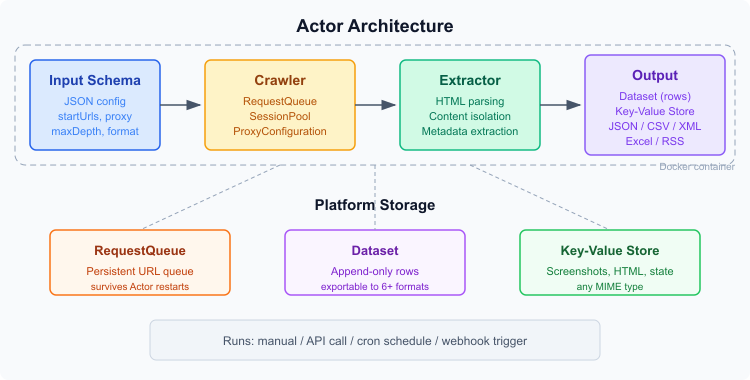 Actor architecture: input schema through crawler and extractor to dataset output
Every Actor has the same shape. A .actor/ directory in the project root contains actor.json (Docker build config, memory limits, timeout) and input_schema.json (what the Actor accepts). The input schema is a JSON Schema document with Apify-specific extensions for rendering a UI in the Apify Console2.
Here's what a content extraction Actor's input schema typically looks like:
{
  "title": "Content Extractor",
  "type": "object",
  "schemaVersion": 1,
  "properties": {
    "startUrls": {
      "title": "URLs to extract",
      "type": "array",
      "editor": "requestListSources",
      "prefill": [{ "url": "https://example.com/article" }]
    },
    "proxyConfiguration": {
      "title": "Proxy",
      "type": "object",
      "editor": "proxy"
    },
    "maxCrawlDepth": {
      "title": "Max crawl depth",
      "type": "integer",
      "minimum": 0,
      "maximum": 20,
      "default": 0
    },
    "outputFormat": {
      "title": "Output format",
      "type": "string",
      "enum": ["markdown", "text", "html"],
      "default": "markdown"
    }
  },
  "required": ["startUrls"]
}
The editor field is the Apify-specific extension -- it tells the Console how to render each field. requestListSources gives you a URL list editor with CSV upload. proxy renders a proxy configuration widget. These don't affect the runtime schema validation, just the UI2.
Output goes to two places: datasets for structured rows (the extracted content, one item per URL) and key-value stores for everything else (screenshots, raw HTML snapshots, run state). Datasets are append-only and export to JSON, CSV, XML, Excel, and RSS. The key-value store is just key-string-to-blob storage with MIME types.
Actor lifecycle in code
The entry point is straightforward. Crawlee (Apify's open-source crawling framework) handles the heavy lifting3:
import { Actor } from 'apify';
import { PlaywrightCrawler } from 'crawlee';

await Actor.init();

const input = await Actor.getInput<Input>();

const crawler = new PlaywrightCrawler({
  proxyConfiguration: await Actor.createProxyConfiguration(
    input.proxyConfiguration
  ),
  maxRequestRetries: 3,
  requestHandler: async ({ page, request }) => {
    const html = await page.content();
    const extracted = extractContent(html); // your extraction logic

    await Actor.pushData({
      url: request.url,
      title: extracted.title,
      content: extracted.content,
      scrapedAt: new Date().toISOString(),
    });
  },
  failedRequestHandler: async ({ request }) => {
    console.log(`Failed: ${request.url} - ${request.errorMessages.join(', ')}`);
  },
});

await crawler.run(input.startUrls);
await Actor.exit();
Actor.init() wires up platform storage. Actor.exit() ensures the process terminates cleanly -- skip it and your container hangs, burning compute credits. Between those two calls, it's a normal Node.js program.
The requestHandler runs once per URL. Whatever you pushData becomes a row in the default dataset. The failedRequestHandler fires after maxRequestRetries exhaustion -- I've found 3 retries to be the right default for content extraction. Some sites have intermittent 503s; more than 3 retries usually means the page genuinely isn't available.
Crawl strategies
Not every extraction job starts with a list of known URLs. Sometimes you need to discover them.
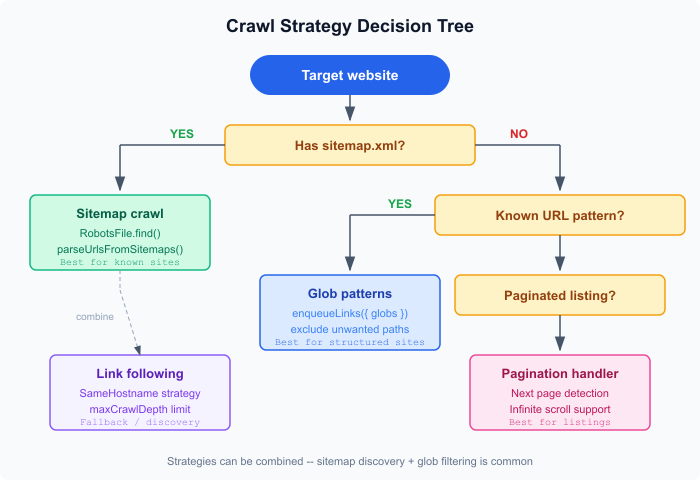 Decision tree for picking the right crawl strategy
Sitemap crawling is the cleanest option when it's available. Most content-heavy sites publish a sitemap.xml (it's in their interest for SEO), and Crawlee can parse it directly:
import { RobotsFile } from 'crawlee';

const robots = await RobotsFile.find('https://example.com');
const urls = await robots.parseUrlsFromSitemaps();
await crawler.addRequests(urls);
This handles nested sitemap indexes, gzipped sitemaps, and the various non-standard formats you encounter in the wild4. It's my go-to for extracting entire sites where I know the content structure.
Glob patterns are for when you want to crawl a site but only care about certain URL shapes. Crawlee's enqueueLinks helper accepts glob patterns to filter discovered links:
requestHandler: async ({ enqueueLinks }) => {
  await enqueueLinks({
    globs: ['https://example.com/blog/**'],
    exclude: ['https://example.com/blog/tags/**'],
    strategy: 'SameHostname',
  });
}
Three enqueue strategies control link discovery scope3: SameHostname (default -- stays on the same subdomain), SameDomain (allows subdomain hopping), and All (follows any link, which you almost never want for extraction).
Pagination requires more manual work. You detect the "next page" link or button in the request handler and enqueue it. For infinite scroll pages, you need Playwright to scroll and wait for new content to load. There's no generic solution here -- pagination is site-specific by nature.
In practice, you combine strategies. Sitemap discovery to find the pages, glob filtering to keep only the articles, depth limiting to avoid crawling into infinite tag pages. The maxCrawlDepth input parameter controls how deep link following goes.
Proxy configuration
Content extraction at scale means dealing with rate limits and IP blocks. Apify offers two proxy tiers5:
Datacenter proxies -- shared IP pools in data centers. Cheap (included in most plans), fast, but easily detected. Fine for sites that don't actively block scrapers, which honestly is most content sites. News outlets, blogs, documentation sites -- datacenter proxies work for probably 80% of extraction targets.
Residential proxies -- traffic routed through real ISP connections. The requests come from actual consumer IP addresses, making them indistinguishable from regular browser traffic5. Priced per GB of data transferred instead of per request. Use these when datacenter IPs get blocked, which typically happens with e-commerce sites, social platforms, and sites running aggressive bot detection.
Setting it up in code:
const proxyConfiguration = await Actor.createProxyConfiguration({
  groups: ['RESIDENTIAL'],
  countryCode: 'US',
});
The countryCode parameter matters more than people realize. Some sites serve different content (or block entirely) based on the request's geographic origin. For English-language content extraction, US proxies are the safe default.
Session management
A session ties a proxy IP to a set of cookies and headers across multiple requests. Without sessions, every request gets a random IP, which looks suspicious -- real users don't change IP addresses between page loads.
Crawlee's SessionPool handles this automatically6:
const crawler = new PlaywrightCrawler({
  useSessionPool: true,
  sessionPoolOptions: {
    maxPoolSize: 100,
    sessionOptions: {
      maxAgeSecs: 300,
      maxUsageCount: 50,
    },
  },
});
The pool creates sessions on demand up to maxPoolSize. When a session gets blocked (HTTP 403, CAPTCHA page), it's retired and a fresh one takes its place. maxUsageCount limits how many requests go through a single session before rotation -- set this based on how aggressive the target site's bot detection is. For content extraction, 50 requests per session is conservative but reliable.
One subtle point: sessions persist across Actor restarts. If your Actor runs out of memory and the platform restarts it, the RequestQueue and SessionPool both survive. This is actually the biggest advantage of running on a platform versus a bare Docker container -- you don't lose progress on a 10,000-URL crawl because of a single OOM crash.
Output and datasets
Every Actor.pushData() call appends a row to the run's default dataset. For content extraction for LLMs, the output typically looks like:
{
  "url": "https://example.com/article",
  "title": "Article Title",
  "content": "The extracted markdown content...",
  "author": "Jane Doe",
  "datePublished": "2026-01-15",
  "wordCount": 1847,
  "scrapedAt": "2026-03-27T14:22:00.000Z"
}
Keep the schema consistent across all items -- downstream consumers (pipelines, databases, RAG systems) depend on predictable field names.
Datasets export via the Apify API in JSON, CSV, XML, Excel, and RSS. You can also access individual items by index, which is useful for pagination in API responses. Named datasets (prefixed with ~) persist across runs, which brings us to incremental extraction.
Scheduling and incremental runs
The platform's scheduler accepts cron expressions. Set an Actor to run 0 6 * * 1 and it fires every Monday at 6 AM UTC. For content extraction, weekly or daily schedules make sense -- you're monitoring sites for new articles, not tracking real-time price changes.
The tricky part is avoiding duplicate work. If you re-crawl a site weekly, you don't want to re-extract pages you've already processed. Two approaches:
Named datasets with deduplication -- push results to a named dataset and check for existing URLs before processing. The Merge, Dedup & Transform Datasets Actor on Apify Store handles the merging side of this7.
RequestQueue with uniqueKey -- every request in the queue has a unique key (defaults to the URL). If you add a URL that's already been processed, Crawlee skips it. Combine this with a persistent named request queue across scheduled runs, and you get incremental crawling almost for free.
I prefer the second approach. It keeps deduplication at the crawl level rather than the output level, which means you don't waste compute fetching and extracting pages you've already seen.
Contextractor's Actor
Contextractor follows this pattern closely. URLs go in, Trafilatura extracts content from the fetched HTML, and structured results come out as dataset rows. The input schema exposes the extraction parameters -- output format (markdown, text, HTML), whether to include comments and tables, precision vs. recall mode.
The proxy configuration defaults to datacenter for most targets and falls back to residential when blocks are detected. Session management handles cookie persistence across pages on the same domain. The request queue is persistent, so if a run gets interrupted, it picks up where it left off.
Nothing about this is particularly clever or novel. That's the point. The Actor pattern handles the infrastructure concerns so the extraction logic can stay focused on one thing: turning HTML into clean text. UNIX philosophy, as promised.
Citations
-
Apify: The Web Actor Programming Model. Version 0.999, February 2025 ↩ ↩2
-
Apify: Actor input schema specification. Retrieved March 27, 2026 ↩ ↩2
-
Apify: Crawlee -- A web scraping and browser automation library. Retrieved March 27, 2026 ↩ ↩2
-
Apify Academy: Crawling sitemaps. Retrieved March 27, 2026 ↩
-
Apify: Proxy documentation. Retrieved March 27, 2026 ↩ ↩2
-
Crawlee: Session Management. Retrieved March 27, 2026 ↩
-
Apify Store: Merge, Dedup & Transform Datasets. Retrieved March 27, 2026 ↩
Updated: March 24, 2026