
Cookie consent handling for web scrapers
Run a headless browser against any European news site and look at the extracted text. Somewhere between the headline and the first paragraph, you'll find something like "We use cookies to improve your experience. By continuing to browse, you agree to our use of cookies. Accept All / Manage Preferences / Reject All." That's not content. That's a consent management platform (CMP) injecting itself into the DOM, and your extractor can't tell the difference.
The ePrivacy Directive -- often called the "cookie law" -- requires websites to get explicit consent before setting non-essential cookies1. GDPR layered additional requirements on top: consent must be freely given, specific, informed, and unambiguous2. The result, since roughly 2018, is that nearly every site serving European visitors shows a cookie consent dialog on first visit.
For scrapers, this created a new category of problem that didn't exist a decade ago.
What actually breaks
A cookie banner isn't just a visual overlay. The CMP typically injects a full-page <div> with position: fixed and a high z-index, often accompanied by a semi-transparent backdrop that covers the entire viewport. Many implementations also set overflow: hidden on <body> to prevent scrolling until the user interacts with the dialog3.
This causes several extraction failures:
Banner text contaminates output -- Trafilatura and other DOM-based extractors work on the full HTML tree. If the CMP's dialog markup is present when extraction runs, the banner text ("We value your privacy", "Manage cookie preferences", vendor lists) ends up in the output. For RAG pipelines and LLM preprocessing, that's noise that wastes tokens and degrades retrieval quality.
Cookie walls block content entirely -- some sites don't just show a banner; they hide page content until consent is given. The European Data Protection Board has criticized this practice, but it persists4. If your scraper doesn't interact with the consent dialog, you get an empty or partial page.
Scroll locking breaks lazy-loaded content -- when overflow: hidden is set on the body, a headless browser can't scroll to trigger lazy-loading images and below-the-fold content. The page looks fully loaded but it isn't.
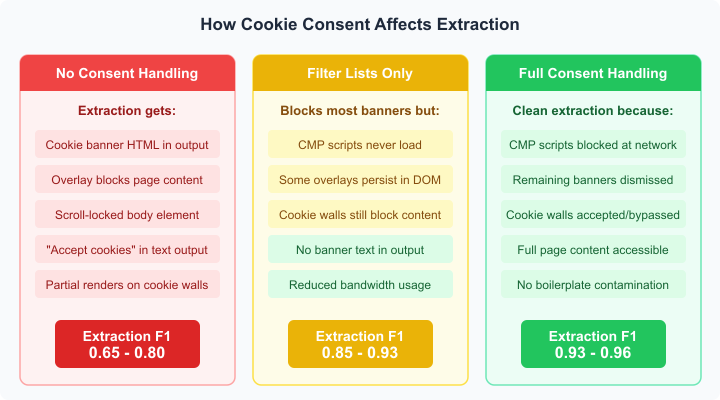 Comparison of extraction quality with no consent handling, filter lists only, and full consent handling
The CMP landscape
Five providers dominate the consent management market. A 2020 study by Nouwens et al. at CHI found that just five CMPs accounted for roughly 58% of the top 10,000 UK websites: OneTrust, Cookiebot (now Usercentrics), Quantcast, TrustArc, and Crownpeak3.
Each injects its dialog differently:
- OneTrust loads
otSDKStub.jsand creates a#onetrust-consent-sdkcontainer. It's the most common CMP on enterprise sites -- OneTrust claims over 300,000 customers. - Cookiebot uses
CookieConsent.jsfromconsent.cookiebot.comand renders into#CybotCookiebotDialog. - Quantcast (Quantcast Choice) injects via
quantcast.mgr.consensu.organd builds its dialog inside an iframe -- which makes it trickier to dismiss programmatically. - TrustArc loads from
consent.trustarc.comand uses#truste-consent-trackas its container.
Smaller sites often use simpler implementations -- a hand-rolled banner with a few lines of JavaScript, or a WordPress plugin like CookieYes or GDPR Cookie Consent. These are less standardized but typically easier to handle because they follow predictable DOM patterns.
Detecting which CMP a site uses is straightforward: check for the script source URLs or the container element IDs. I'd say about 80% of the time you can identify the CMP within a couple of seconds of page load by looking for known selectors.
Strategy: network-level blocking with filter lists
The most effective first line of defense is preventing the CMP from loading at all. If the consent management script never executes, it can't create a dialog, can't lock the page, and can't inject banner markup into the DOM.
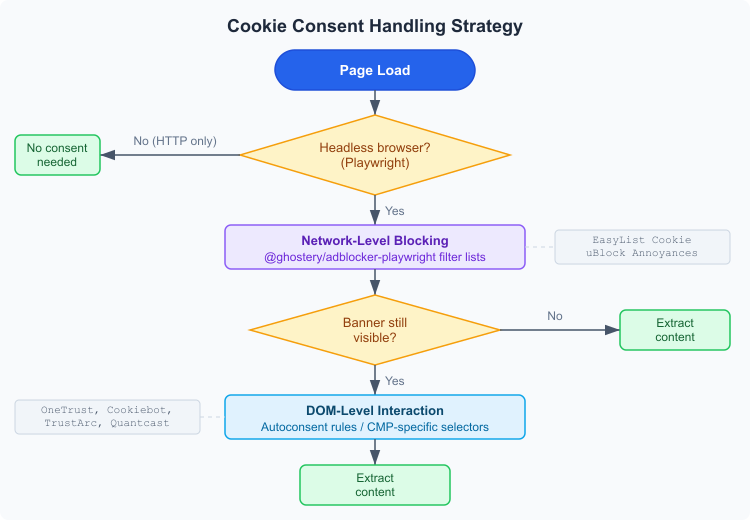 Flowchart showing the two-layer approach: network blocking first, then DOM interaction for remaining banners
@ghostery/adblocker-playwright is an ad and tracker blocking library built by the team behind the Ghostery browser extension5. It parses community-maintained filter lists -- EasyList, EasyPrivacy, EasyList Cookie, uBlock Origin annoyances -- and applies them as network intercepts and cosmetic filters in Playwright.
The key filter list for consent handling is EasyList Cookie, which specifically targets cookie consent dialogs6. It contains both network rules (blocking CMP script URLs) and cosmetic rules (hiding dialog elements via CSS selectors). uBlock Origin's annoyances list provides additional coverage.
Here's the basic integration:
import { PlaywrightBlocker } from "@ghostery/adblocker-playwright";
import { chromium } from "playwright";

const browser = await chromium.launch();
const page = await browser.newPage();

// Load filter lists and enable blocking
const blocker = await PlaywrightBlocker.fromPrebuiltAdsAndTracking(fetch);
await blocker.enableBlockingInPage(page);

await page.goto("https://example.com/article");
const html = await page.content();
// Extract from clean HTML -- no consent banner present
fromPrebuiltAdsAndTracking loads a prebuilt engine that includes EasyList and EasyPrivacy. For consent-specific blocking, fromPrebuiltFull adds the EasyList Cookie and annoyances lists. The engine supports 99% of filters from EasyList and uBlock Origin formats5.
There's a subtlety here. Network blocking prevents the CMP script from loading, which means the consent dialog never renders. But some sites bake the banner HTML directly into their server-side rendered markup rather than injecting it via JavaScript. For those, you need cosmetic filtering -- CSS rules that hide the elements. The Ghostery library handles both, which is why it's more effective than just blocking requests with page.route().
Apify's team arrived at the same conclusion when building their Website Content Crawler. They evaluated browser extensions (I Don't Care About Cookies, its forks, Cookie Dialog Monster), found coverage gaps and maintenance issues, and settled on Ghostery's filter list approach for Playwright7.
Strategy: DOM-level interaction with autoconsent
Filter lists handle the majority of cases, but they can't cover everything. Some consent implementations are too tightly coupled with the page -- blocking them breaks site functionality or leaves remnant elements in the DOM.
That's where autoconsent comes in. Built by DuckDuckGo, it's a library of rules for programmatically interacting with consent popups8. Instead of blocking the CMP, autoconsent detects it, finds the "reject all" or "accept all" button, and clicks it.
Each CMP gets a rule set with three phases:
detectCMP-- checks whether a specific consent platform is present (looks for known selectors or scripts)detectPopup-- confirms the dialog is actually visibleoptOut(oroptIn) -- a sequence of actions: click a button, wait for a panel, click another button, wait for the dialog to close
Rules are defined as JSON:
{
  "name": "onetrust",
  "detectCMP": [{ "exists": "#onetrust-consent-sdk" }],
  "detectPopup": [{ "visible": "#onetrust-banner-sdk" }],
  "optOut": [
    { "waitForThenClick": "#onetrust-reject-all-handler" }
  ]
}
The real-world rules are more complex -- OneTrust's "reject all" button isn't always on the first screen, Cookiebot's granular controls need multiple clicks, and Quantcast's iframe-based implementation requires special handling. Autoconsent has rules for over 100 CMPs and site-specific implementations8.
One annoyance with autoconsent: it's designed to interact with the dialog, which means it waits for it to appear. That adds latency -- typically 1-3 seconds per page while it detects the CMP and executes the click sequence. Filter lists are instant because they prevent loading entirely.
Combining both layers
The practical approach is to stack them. Use filter lists as the primary defense to block most consent dialogs at the network level, then fall back to autoconsent for anything that slips through.
import { PlaywrightBlocker } from "@ghostery/adblocker-playwright";
import { chromium } from "playwright";

const browser = await chromium.launch();
const page = await browser.newPage();

// Layer 1: network-level blocking
const blocker = await PlaywrightBlocker.fromPrebuiltFull(fetch);
await blocker.enableBlockingInPage(page);

await page.goto("https://example.com/article", {
  waitUntil: "domcontentloaded",
});

// Layer 2: check if any banner survived
const bannerVisible = await page.evaluate(() => {
  const selectors = [
    "#onetrust-banner-sdk",
    "#CybotCookiebotDialog",
    '[id*="truste-consent"]',
    ".qc-cmp2-container",
    '[class*="cookie-banner"]',
    '[class*="consent-banner"]',
  ];
  return selectors.some((s) => {
    const el = document.querySelector(s);
    return el && el.offsetHeight > 0;
  });
});

if (bannerVisible) {
  // Try common "reject all" / "accept all" buttons
  const rejectSelectors = [
    "#onetrust-reject-all-handler",
    "#CybotCookiebotDialogBodyButtonDecline",
    '[class*="reject"]',
    'button[title="Reject All"]',
  ];

  for (const selector of rejectSelectors) {
    const button = await page.$(selector);
    if (button) {
      await button.click();
      await page.waitForTimeout(500);
      break;
    }
  }
}

const html = await page.content();
This is a simplified version. Production code needs to handle iframes (Quantcast), multi-step dialogs (OneTrust's "manage preferences" flow), and timeouts for sites where the CMP loads slowly. But the two-layer pattern is the right architecture.
Crawlee's closeCookieModals
If you're using Crawlee for your crawling infrastructure, there's a built-in helper: closeCookieModals(). It's available on both PlaywrightCrawlingContext and PuppeteerCrawlingContext9.
Under the hood, it's based on the "I Don't Care About Cookies" browser extension -- a community project that Daniel Kladnik maintained from 2012 until Avast acquired it in September 202210. The extension stopped receiving meaningful updates after the acquisition, and forks like "I Still Don't Care About Cookies" picked up some slack.
Crawlee extracted the extension's rules into a standalone script that runs inside the headless browser context. It works, but coverage has eroded as CMPs update their implementations. The Crawlee team recommends @ghostery/adblocker-playwright as the primary approach in newer projects, with closeCookieModals() as a fallback9.
Worth noting: closeCookieModals() requires the idcac-playwright package to be installed separately -- Crawlee doesn't bundle it due to licensing concerns.
Cookie walls versus cookie banners
There's an important distinction that affects scraping strategy. A cookie banner is an overlay that asks for consent but doesn't restrict access to page content. You can usually extract the article text even with the banner present (though it'll appear in your output). A cookie wall blocks all content until consent is given -- the page behind the dialog is either empty or shows only a teaser.
The EDPB's position is that cookie walls violate GDPR because consent obtained under the threat of losing access isn't "freely given"4. But enforcement is uneven across EU member states, and plenty of sites -- especially news publishers with paywall-adjacent models -- still use them.
For scraping, cookie walls are the harder problem. Filter lists won't help because the content genuinely isn't rendered until the server gets a consent signal (usually a cookie being set). You need to actively accept cookies, which means your scraper must:
- Detect the wall (check if the main content area is empty or hidden)
- Submit consent (click "accept all" or set the consent cookie directly)
- Re-render the page (or navigate again with the cookie set)
Setting the consent cookie directly -- without clicking through the CMP -- is sometimes the cleanest approach. OneTrust uses OptanonAlertBoxClosed and OptanonConsent cookies; Cookiebot uses CookieConsent. If you can set these before navigation, the CMP won't show at all:
await page.context().addCookies([
  {
    name: "OptanonAlertBoxClosed",
    value: new Date().toISOString(),
    domain: ".example.com",
    path: "/",
  },
  {
    name: "OptanonConsent",
    value: "isGpcEnabled=0&datestamp=...",
    domain: ".example.com",
    path: "/",
  },
]);
await page.goto("https://example.com/article");
The cookie values vary by site configuration. You'll need to inspect the CMP setup on each target domain to get the right format. It's fragile -- CMPs update their cookie schemas -- but for high-value targets it can be the most reliable method.
What Contextractor does
Contextractor's Apify actor uses @ghostery/adblocker-playwright as its default consent handling strategy. When the actor launches a PlaywrightCrawler, it initializes the Ghostery blocker with the full filter set (EasyList + EasyPrivacy + Cookie + annoyances) and enables it on every page before navigation.
This handles the vast majority of consent dialogs without any per-site configuration. The actor doesn't use autoconsent or closeCookieModals() -- the filter list approach alone provides sufficient coverage for the general-purpose extraction use case, and it avoids the latency penalty of waiting for dialogs to appear and then clicking through them.
For HTTP-only extraction (when the target page doesn't need JavaScript rendering), consent handling isn't needed at all. The CMP script doesn't execute without a browser engine, so there's no dialog and no banner markup in the HTML. That's another reason to prefer CheerioCrawler when you can get away with it -- fewer problems to solve.
The legal angle (briefly)
Auto-accepting or blocking cookie consent dialogs for data extraction doesn't change your legal obligations. If you're scraping personal data from EU-targeted websites, GDPR applies to your processing regardless of whether you clicked "accept" on the cookie banner2. The consent banner governs the site's use of cookies on your browser -- it has nothing to do with your right to scrape the page content.
That said, respecting robots.txt, not overwhelming servers with requests, and being transparent about your scraping activities are still good practice -- and arguably more relevant to legal compliance than cookie consent handling.
Citations
-
European Parliament: Directive 2002/58/EC (ePrivacy Directive). Official Journal of the European Union, July 12, 2002 ↩
-
European Parliament: Regulation (EU) 2016/679 (GDPR), Article 7 -- Conditions for consent. Official Journal of the European Union, April 27, 2016 ↩ ↩2
-
Midas Nouwens, Ilaria Liccardi, Michael Veale, David Karger, Lalana Kagal: Dark Patterns after the GDPR: Scraping Consent Pop-ups and Demonstrating their Influence. Proceedings of CHI 2020 ↩ ↩2
-
Ghostery: adblocker -- Efficient embeddable adblocker library. Retrieved March 27, 2026 ↩ ↩2
-
EasyList: EasyList filter subscriptions. Retrieved March 27, 2026 ↩
-
DuckDuckGo: autoconsent -- Library of rules for navigating consent popups. Retrieved March 27, 2026 ↩ ↩2
-
Apify: Crawlee documentation -- PlaywrightCrawlingContext. Retrieved March 27, 2026 ↩ ↩2
-
I Don't Care About Cookies: Acquisition announcement. Retrieved March 27, 2026 ↩
Updated: March 26, 2026