
Crawlee + Contextractor: building a full-stack extraction pipeline
Most scraping projects have two distinct problems. The first is getting the HTML — dealing with request queues, retries, proxy rotation, JavaScript rendering, and all the anti-bot countermeasures sites throw at you. The second is pulling useful text out of that HTML — stripping navigation, ads, footers, and boilerplate to get the actual article content.
Crawlee solves the first problem. It's a TypeScript/JavaScript crawling library built by Apify that manages request queues, proxy rotation, session pools, and browser automation1. Contextractor solves the second — it runs Trafilatura under the hood to extract clean text and metadata from raw HTML2.
Wiring them together gives you a pipeline that goes from seed URLs to clean, structured content in an Apify dataset. No intermediate files, no manual HTML parsing.
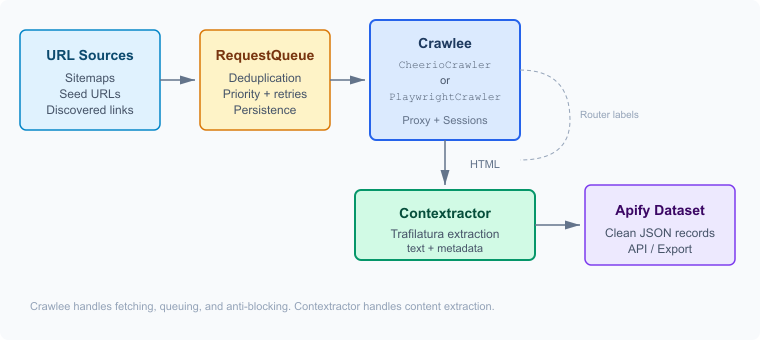 Pipeline flow: URL sources through Crawlee crawling to Contextractor extraction to Apify dataset
The two crawlers you'll actually use
Crawlee ships several crawler classes, but in practice you'll pick between two: CheerioCrawler and PlaywrightCrawler1.
CheerioCrawler makes plain HTTP requests using the got-scraping client and parses the response with Cheerio (a server-side jQuery-like API). It's fast — on a single CPU core with 4 GB of memory, it can chew through 500+ pages per minute. Memory usage sits around 100-200 MB. The catch: it doesn't execute JavaScript. If the page content is in the initial HTML response, use this. Most news sites, blogs, and documentation pages work fine.
PlaywrightCrawler launches a headless browser (Chromium by default) and waits for the page to render. Throughput drops to maybe 10-50 pages per minute, and memory jumps to 2-4 GB. But it handles SPAs, lazy-loaded content, infinite scroll — anything that needs a real browser engine.
I'd estimate 70-80% of content extraction jobs can get away with CheerioCrawler. The remaining cases — React apps, sites with aggressive bot protection that fingerprint TLS, anything behind client-side rendering — need Playwright. Start with Cheerio, upgrade when you have to.
Both crawlers share the same base class (BasicCrawler), so switching between them means changing the import and adjusting the request handler signature. The queue management, dataset storage, and proxy configuration code stays identical1.
Request queue and routing
Crawlee's RequestQueue is a persistent, deduplicated URL queue. You seed it with starting URLs, and as your crawler discovers new links via enqueueLinks(), they get added automatically — duplicates filtered out, failed requests retried up to maxRequestRetries times (defaults to 3)1.
The interesting part is the router pattern. Instead of one giant requestHandler with a chain of if/else blocks, you create labeled handlers:
import { createCheerioRouter, CheerioCrawler, Dataset } from "crawlee";

const router = createCheerioRouter();

router.addDefaultHandler(async ({ enqueueLinks, log }) => {
  log.info("Listing page — discovering article links");
  await enqueueLinks({
    globs: ["https://example.com/blog/*"],
    label: "ARTICLE",
  });
});

router.addHandler("ARTICLE", async ({ request, $ }) => {
  const html = $.html();
  // Send to Contextractor for extraction
  const extracted = await extractWithContextractor(html, request.loadedUrl);
  await Dataset.pushData(extracted);
});
The default handler runs on your seed URLs. It finds article links matching the glob pattern and enqueues them with the "ARTICLE" label. When those requests get processed, they hit the "ARTICLE" handler instead. Clean separation — discovery logic in one function, extraction logic in another.
The globs parameter on enqueueLinks accepts glob patterns (*, ?, **) for URL matching1. You can also use strategy: 'same-domain' or 'same-hostname' to control crawl scope without writing explicit patterns. Handy for sites where you don't know the URL structure upfront.
Proxy rotation and sessions
Any serious scraping job needs proxy rotation. Crawlee wraps this in ProxyConfiguration:
import { ProxyConfiguration } from "crawlee";

const proxyConfiguration = new ProxyConfiguration({
  tieredProxyUrls: [
    [null],                         // tier 0: no proxy
    ["http://datacenter-proxy:8080"], // tier 1: cheap datacenter
    ["http://residential-proxy:8080"], // tier 2: residential
  ],
});
The tiered approach is genuinely clever — Crawlee starts with the cheapest proxy tier (or no proxy at all) and automatically escalates to higher tiers when it detects blocking. Most pages on most sites don't need residential proxies. You save money by only using them for the pages that fail on cheaper options3.
SessionPool ties into this. Each session binds a proxy IP to a set of cookies and headers, mimicking a real browsing session. Sessions that get blocked are retired; healthy sessions stay in rotation. Enable it with two flags:
const crawler = new CheerioCrawler({
  proxyConfiguration,
  useSessionPool: true,
  persistCookiesPerSession: true,
  requestHandler: router,
});
On Apify, you'd typically use their built-in proxy service instead of self-managed proxy lists — same ProxyConfiguration API, but with groups: ['RESIDENTIAL'] or ['DATACENTER'] and automatic rotation handled by the platform4.
Feeding HTML to Contextractor
Here's where the two halves connect. Crawlee fetches the page; you need to send the HTML to Contextractor's extraction endpoint and get back clean text.
With CheerioCrawler, you already have the parsed HTML — call $.html() to get the raw string. With PlaywrightCrawler, use page.content() to grab the fully rendered DOM.
async function extractWithContextractor(
  html: string,
  sourceUrl: string
): Promise<ExtractionResult> {
  const response = await fetch("https://api.contextractor.com/extract", {
    method: "POST",
    headers: { "Content-Type": "application/json" },
    body: JSON.stringify({ html, url: sourceUrl }),
  });
  return response.json();
}
The response gives you the main text content, title, author, date, and other metadata that Trafilatura can pull from the page. The url parameter matters — Contextractor uses it for metadata extraction and relative URL resolution.
For self-hosted setups, you'd point at your own Contextractor instance instead. The Apify Actor pattern article covers deploying Contextractor as an Actor if you want everything running on the same platform.
Putting it together
A complete Actor that crawls a blog, extracts content from each article, and stores clean results:
import { Actor } from "apify";
import {
  CheerioCrawler,
  createCheerioRouter,
  Dataset,
  ProxyConfiguration,
} from "crawlee";

await Actor.init();

const router = createCheerioRouter();

router.addDefaultHandler(async ({ enqueueLinks }) => {
  await enqueueLinks({
    globs: ["https://example.com/blog/*/"],
    label: "ARTICLE",
  });
  // Follow pagination
  await enqueueLinks({
    globs: ["https://example.com/blog/page/*"],
  });
});

router.addHandler("ARTICLE", async ({ request, $, log }) => {
  const html = $.html();
  const response = await fetch("https://api.contextractor.com/extract", {
    method: "POST",
    headers: { "Content-Type": "application/json" },
    body: JSON.stringify({ html, url: request.loadedUrl }),
  });
  const extracted = await response.json();

  log.info(`Extracted: ${extracted.title}`);
  await Dataset.pushData({
    url: request.loadedUrl,
    title: extracted.title,
    author: extracted.author,
    date: extracted.date,
    text: extracted.text,
    scrapedAt: new Date().toISOString(),
  });
});

const crawler = new CheerioCrawler({
  requestHandler: router,
  maxRequestsPerCrawl: 200,
  maxConcurrency: 10,
});

await crawler.run(["https://example.com/blog/"]);
await Actor.exit();
Pagination is just another enqueueLinks call in the default handler — pages matching /blog/page/* get the default handler again, which discovers more article links on each page. The queue deduplicates everything, so you don't need to track which pages you've already visited.
When to switch to PlaywrightCrawler
The Cheerio-based version above won't work for sites that render content client-side. Swap to PlaywrightCrawler when:
- The page serves an empty
<div id="root"></div>and loads content via JavaScript - Content appears only after scroll events or user interaction
- The site uses aggressive bot detection that checks browser fingerprints (TLS, canvas, WebGL)
- You need to interact with the page — clicking "load more" buttons, dismissing modals, accepting cookie consent
The handler signature changes slightly — you get a page object (Playwright's Page) instead of $ (Cheerio):
import { PlaywrightCrawler, createPlaywrightRouter } from "crawlee";

const router = createPlaywrightRouter();

router.addHandler("ARTICLE", async ({ request, page, log }) => {
  await page.waitForSelector("article");
  const html = await page.content();
  // Same Contextractor call as before
  const extracted = await extractWithContextractor(html, request.loadedUrl);
  await Dataset.pushData(extracted);
});
The page.waitForSelector("article") call is important — it ensures the content has actually rendered before you grab the HTML. Without it, you might send Contextractor a half-loaded page. For sites with lazy loading, you might need page.evaluate(() => window.scrollTo(0, document.body.scrollHeight)) to trigger content that loads on scroll.
Memory-wise, PlaywrightCrawler defaults to running one browser with multiple pages. Set maxConcurrency conservatively — 3-5 concurrent pages is reasonable for a 4 GB Actor. Going higher risks OOM kills.
Why not just use Readability or Cheerio selectors?
Fair question. You could skip Contextractor entirely and write CSS selectors for each site. That works great when you're scraping one site with a stable layout. The moment you need to handle dozens of different page structures — different news sites, different blog platforms, different CMSes — writing and maintaining per-site selectors becomes a maintenance nightmare.
Content extraction with Trafilatura is site-agnostic. It figures out where the article is regardless of the markup structure. The SIGIR 2023 benchmark tested this across eight different datasets and found that heuristic extractors like Trafilatura outperformed both manual selector approaches and neural models on heterogeneous pages5.
There's also the headless browser vs. extraction angle. A common mistake is using Playwright to try to parse content by selecting DOM elements — that's scraping, not extraction. The browser handles rendering; the extractor handles figuring out what the content actually is. Different jobs.
Storing results
Crawlee's Dataset.pushData() writes records to Apify's dataset storage — JSON objects accessible via the API or exportable as CSV, JSON, Excel after the run finishes6. Each record becomes a row in the dataset.
For LLM-focused pipelines, you'll likely want the extracted text chunked and stored in a vector database downstream. The dataset serves as a clean intermediate format — every record has the URL, extracted text, metadata, and a timestamp. A separate Actor or script can pick up from there, chunk the text, generate embeddings, and push to Pinecone or Qdrant or whatever vector store you're using.
Named datasets are useful when you want to share results across multiple Actor runs:
const dataset = await Actor.openDataset("my-corpus");
await dataset.pushData(extracted);
This creates a persistent dataset that accumulates results across runs rather than starting fresh each time.
Citations
-
Crawlee: Documentation. Retrieved March 27, 2026 ↩ ↩2 ↩3 ↩4 ↩5
-
Contextractor: API Documentation. Retrieved March 27, 2026 ↩
-
Crawlee: Proxy Management. Retrieved March 27, 2026 ↩
-
Apify: Proxy Management. Retrieved March 27, 2026 ↩
-
Janek Bevendorff, Sanket Gupta, Johannes Kiesel, Benno Stein: An Empirical Comparison of Web Content Extraction Algorithms. Proceedings of SIGIR 2023 ↩
-
Apify: Dataset Storage. Retrieved March 27, 2026 ↩
Updated: March 24, 2026