
Beyond news articles — extracting from docs, forums, and e-commerce
Every content extraction benchmark I've seen is dominated by news articles. The SIGIR 2023 study by Bevendorff et al. combined eight datasets — and six of them were predominantly news pages1. The ScrapingHub benchmark? News articles. CleanPortalEval? BBC, MSNBC, Wall Street Journal, Washington Post1. That's fine for evaluating extractors on a controlled problem, but it doesn't reflect what developers actually need to extract.
Real pipelines hit developer documentation with tabbed code blocks. Forum threads with nested replies and user signatures. E-commerce product pages where specs live in JavaScript-rendered tabs. Wiki pages dense with tables and infoboxes. These are structurally nothing like a news article, and extractors weren't built for them.
So what happens when you point Trafilatura — or any heuristic extractor — at these page types? The honest answer: it depends.
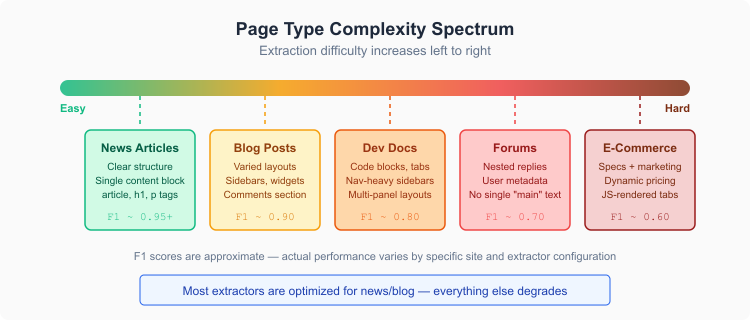 Extraction difficulty varies dramatically by page type
Developer documentation
Documentation sites are surprisingly hostile to content extraction. Not because the content is hidden — it's right there — but because the page structure fights the extractor's assumptions.
Take the React docs, or the Python standard library reference, or Stripe's API documentation. The actual content sits in a narrow center column flanked by a sidebar navigation tree on the left and a table-of-contents on the right. Code blocks alternate with prose paragraphs. Tabbed interfaces show the same concept in multiple languages. Collapsible sections hide content behind click interactions.
Trafilatura handles the basics decently — it'll pull the prose and usually the code blocks. But here's where it gets messy:
Sidebar nav bleeds in — documentation sidebars aren't always <nav> elements. Some sites render them as <div> trees with <a> tags, and if the link density heuristic doesn't catch them, you get the entire documentation table of contents prepended to your extracted text. Setting favor_precision=True helps, but you lose content too.
Tabbed code blocks — if a docs page shows Python, JavaScript, and Go examples in tabs, only the active tab's content is in the initial HTML. The rest loads via JavaScript or gets hidden with CSS. Static extraction sees one language variant; the others are invisible. This isn't a Trafilatura problem specifically — any extractor that doesn't render JavaScript will miss it2.
API reference tables — pages listing function signatures, parameter types, and return values in structured tables extract poorly as plain text. With include_tables=True (the default), you get the data, but the formatting collapses into a flat paragraph that's hard to parse downstream3.
What actually works: favor_recall=True combined with prune_xpath to strip the sidebar. Something like:
result = extract(
    html,
    favor_recall=True,
    include_tables=True,
    prune_xpath=["//nav", "//aside", "//div[contains(@class, 'sidebar')]"]
)
You'll need to tune prune_xpath per documentation framework. Docusaurus, GitBook, Read the Docs, and Sphinx all use different class naming conventions. There's no universal XPath that handles all of them.
Forum threads
Forums are the page type that breaks the fundamental assumption of content extraction — that a page has one main content block.
A Stack Overflow question page has an original question, multiple answers sorted by votes, comments on each answer, user reputation badges, related question sidebars, and tag metadata. Which part is "the content"? All of it? Just the accepted answer? The question plus the top answer?
Content extractors don't know. They weren't designed for this.
With include_comments=True (default in Trafilatura), you'll get most of the text from question-and-answer sites. But the output is a wall of undifferentiated text — question, answers, and comments all merged together with no way to tell which user said what. User metadata (reputation, join date, edit history) either disappears or clutters the output.
Reddit threads are worse. Nested comment trees can go ten levels deep. Each comment has vote counts, timestamps, and user flair. The extractor sees all of this as "content" and the structural hierarchy — which comment replied to which — vanishes completely in the extracted output.
The favor_precision=True flag on Trafilatura actually makes forums harder, not easier. It aggressively filters short text blocks, but forum comments are short text blocks. You end up with just the original post and maybe the longest reply.
My recommendation for forums: don't use content extraction. Use targeted scraping instead. If you're pulling Stack Overflow data, use their API. For Reddit, use the API (or a structured scraper that respects the DOM hierarchy). You need the structure — which user posted which reply in response to which comment — and that's information content extraction deliberately throws away.
For Discourse-based forums (many open-source project forums use Discourse), there's a JSON API at /t/{topic-id}.json that gives you structured thread data. Way more useful than trying to extract from the rendered HTML.
E-commerce product pages
This is where I'd say extraction tools struggle the most, and honestly I'm not sure the problem is solvable with general-purpose extraction.
A product page on Amazon has: a title, a price (sometimes multiple prices — was/now, subscribe-and-save), bullet-point features written by the marketing team, a product description that might be HTML or might be an image (!), specification tables, customer reviews, "frequently bought together" suggestions, and sponsored product ads. The actual information a user cares about is scattered across at least five structurally distinct regions of the page.
And then there's JavaScript. Modern e-commerce sites render product details, pricing, and reviews through client-side JavaScript. The initial HTML might contain a skeleton loader and not much else. You need a headless browser (Playwright, Puppeteer) to get the rendered DOM before you can even attempt extraction4.
Even after rendering, the results are mediocre at best. I ran Trafilatura with various configurations against rendered Amazon product pages, and the output consistently mixed marketing copy, specification data, review snippets, and navigation elements into an undifferentiated blob. include_tables=True captures the spec tables, but they're interleaved with "Customers who viewed this also viewed" noise.
For product pages, you're better off with:
- Structured data first — most e-commerce sites embed JSON-LD or Microdata schema.org markup. Extract that before touching the visible content. It gives you product name, price, availability, ratings, and description in clean structured format.
- Targeted scraping second — write selectors for the specific product detail elements. Yes, they break when the site redesigns. That's the trade-off.
- Content extraction as a fallback — if you're processing thousands of different e-commerce domains and can't write per-site scrapers, extraction with
favor_recall=Truegives you "something" even if it's noisy.
Wiki pages
Wikipedia and MediaWiki sites sit somewhere in the middle of the difficulty spectrum. The page structure is more predictable than forums or e-commerce — there's a single content column with a clear hierarchy of headings, paragraphs, tables, and infoboxes. That's good.
What's tricky is the density of structured data. A Wikipedia article about a country might have an infobox with 30 fields (population, GDP, area, capital, government type), half a dozen data tables, reference lists with hundreds of citations, and "See also" / "External links" sections that are purely navigational.
Trafilatura handles the main prose well. The include_tables=True parameter captures data tables, though the output formatting can be rough — a complex table with merged cells becomes a confusing flat text block. Infoboxes (which are <table> elements with special classes) come through as table data, which is usually what you want.
The real problem with wiki pages is the reference noise. Wikipedia articles are heavily footnoted, and the extracted text includes citation markers like [1][2][3] or [citation needed] interleaved with the actual content. If you're feeding this into an LLM pipeline, that's noise that eats tokens without adding value.
prune_xpath to the rescue again:
result = extract(
    html,
    include_tables=True,
    prune_xpath=[
        "//div[@id='catlinks']",
        "//div[contains(@class, 'reflist')]",
        "//span[@class='mw-editsection']"
    ]
)
This strips category links, reference lists, and edit-section links. It won't remove inline citation markers from the text itself, but it cuts a lot of the structural noise.
Configuration strategies by page type
There's no single Trafilatura configuration that works across all page types. Here's what I've landed on after testing against dozens of sites per category:
| Page Type | favor_precision | favor_recall | include_tables | include_comments | Key prune_xpath targets |
|---|---|---|---|---|---|
| News articles | - | - | off | off | Ad containers |
| Developer docs | - | on | on | off | Sidebar nav, TOC |
| Forum threads | - | on | off | on | User profiles, vote counts |
| E-commerce | - | on | on | off | Related products, ads |
| Wiki pages | - | - | on | off | Ref lists, edit links, categories |
A dash means leave at default (False). The favor_precision and favor_recall flags are mutually exclusive — setting both raises a ValueError3.
Notice that I don't recommend favor_precision for any of these page types. Precision mode is designed for building clean training datasets from article-like pages. On non-article pages, it throws away too much.
When extraction alone isn't enough
I want to be direct about this: content extraction is the wrong tool for about half of the non-article page types developers encounter.
If you need structured product data — prices, SKUs, availability, specifications with specific field names — that's a scraping problem, not an extraction problem. Write selectors, or use a product data API like those from Zyte or ScrapeHero.
If you need threaded discussion structure — who replied to whom, vote counts, timestamps per post — extraction destroys that information by design. Use the platform's API or a structure-aware scraper.
If you need code blocks with language annotations — which language, which framework, whether it's the complete example or a snippet — content extraction strips that metadata. Parse the <pre> and <code> elements directly.
Content extraction works well when you need the prose content from a page and you don't particularly care about the page's structural metadata. Building a search index over documentation? Extraction is fine. Training a language model on wiki content? Extraction is fine. Populating a RAG knowledge base with forum discussions? Probably fine, as long as you don't need attribution.
The moment you need structure or specific fields, switch to scraping. And there's nothing wrong with combining both — extract the prose with Trafilatura, scrape the structured bits with CSS selectors, merge the results downstream. That's usually what production pipelines end up doing anyway.
Trafilatura's own documentation acknowledges this directly: the library is "geared towards article pages, blog posts, main text parts"4. Everything else is best-effort. Knowing where that boundary falls — and having a plan for what sits beyond it — is the difference between a pipeline that works and one that silently produces garbage.
Citations
-
Janek Bevendorff, Sanket Gupta, Johannes Kiesel, Benno Stein: An Empirical Comparison of Web Content Extraction Algorithms. Proceedings of SIGIR 2023 ↩ ↩2
-
Trafilatura: Documentation. Retrieved March 27, 2026 ↩
-
Trafilatura: Core functions. Retrieved March 27, 2026 ↩ ↩2
-
Trafilatura: Troubleshooting. Retrieved March 27, 2026 ↩ ↩2
Updated: March 25, 2026