
Output format showdown: plain text vs. Markdown vs. XML-TEI for AI pipelines
You ran an extractor on a web page. The boilerplate is gone, the nav is gone, the cookie banners are gone. Now what?
The next decision — which output format to use — gets surprisingly little attention considering how much it affects everything downstream. Trafilatura supports seven formats: plain text, Markdown, cleaned HTML, XML (custom schema), XML-TEI, JSON, and CSV1. Most extraction tools give you two or three options at best. But the choice isn't just about preference; it determines your token budget, what structure survives, and how much post-processing you'll need.
For AI-specific context on why content extraction matters before you even get to format selection, see the extraction for LLMs guide.
What gets preserved (and what doesn't)
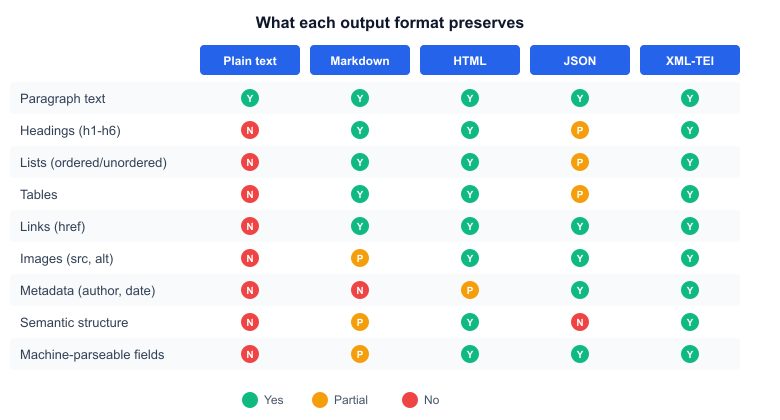 Feature retention by output format
The gap between formats is wider than most people assume.
Plain text keeps the words and nothing else. Headings become indistinguishable from body paragraphs. Tables collapse into space-separated values. Links vanish — you get the anchor text but not the URL. For embedding pipelines where you're just computing vector representations of meaning, that's fine. For anything else, you're throwing away signals.
Markdown sits in an interesting middle ground. It preserves headings (##), lists, tables (pipe syntax), and links while adding almost no token overhead — roughly 10% more tokens than plain text for a typical article1. The ## and - markers are cheap. This is why the /llms.txt proposal, introduced by Jeremy Howard in September 2024, chose Markdown as the standard format for LLM-readable documentation2.
Cleaned HTML retains the most structural information: semantic tags, table markup, image references, link targets. The catch is token cost. HTML tags aren't free — <h2>, <p>, <table>, <tr>, <td> all eat into your context window.
JSON wraps the extracted text plus metadata (title, author, date, categories, tags) in a structured envelope. The text body itself is typically plain or lightly formatted, but the metadata fields are machine-parseable without regex. Trafilatura's JSON output nests the content alongside fields like title, author, date, sitename, and source1.
XML-TEI is the heavyweight. The Text Encoding Initiative standard, maintained by the TEI Consortium since 1987, defines an XML vocabulary for encoding texts in humanities research3. Trafilatura's TEI output includes a full <teiHeader> with bibliographic metadata, and the body text gets semantic markup — <p>, <head>, <list>, <item>, <table>, <ref>. You can validate it against the TEI schema with tei_validation=True1. It's also the most expensive format in tokens, nearly doubling the plain text count.
Token costs are not equal
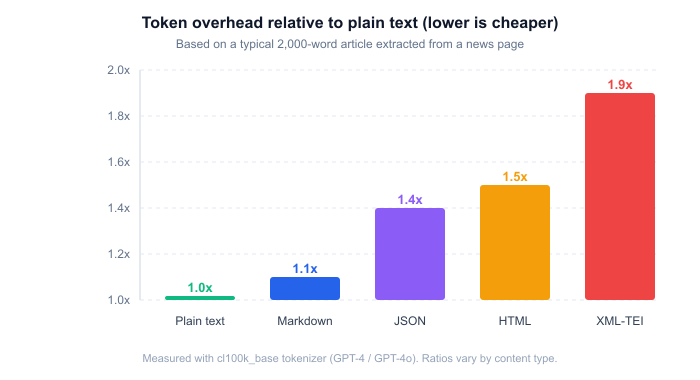 Token overhead relative to plain text
This matters more than it used to. Even with 128K-token context windows, most RAG pipelines stuff multiple retrieved documents into a single prompt. If you're retrieving 10 chunks at 2,000 tokens each, format overhead adds up fast.
Markdown's ~10% overhead is almost negligible. JSON adds roughly 40% because of the metadata wrapper and field delimiters — "key": "value" isn't cheap to tokenize. HTML runs about 50% over plain text, mostly from tag pairs. XML-TEI nearly doubles the token count, between the <teiHeader> block and verbose element names like <p rend="indent">.
(These ratios shift depending on content type. Table-heavy pages see higher HTML and Markdown overhead; short articles with long metadata fields make JSON proportionally more expensive.)
The token cost reduction guide covers broader strategies for keeping context window usage under control.
Plain text: when less is more
For embedding-based retrieval, plain text is hard to beat. Embedding models like OpenAI's text-embedding-3-large or Cohere's embed-v3 don't understand Markdown syntax or HTML tags — they treat ## as two hash characters, not as a heading marker. Stripping all formatting before embedding means every token carries semantic weight rather than structural noise.
The same applies to classification and sentiment analysis tasks. If you're routing documents by topic or scoring them for tone, the formatting carries no useful signal and the extra tokens just add latency.
Simple text-to-speech pipelines also want raw text. Heading markers and Markdown syntax would get read aloud as literal characters.
There's an honesty to plain text. It makes no promises about structure it can't keep.
Markdown: the LLM sweet spot
Most LLMs were trained on enormous quantities of Markdown — GitHub READMEs, documentation sites, Stack Overflow posts, technical blogs. They've seen so much of it that they parse ## headings and - item lists natively, without needing any special instructions.
Jina's ReaderLM-v2, a 1.5B-parameter model specifically built for HTML-to-Markdown conversion, outperforms GPT-4o on content extraction benchmarks, achieving ROUGE-L scores of 0.84-0.86 versus GPT-4o's 0.69 on main content extraction4. That a purpose-built small model can beat a frontier model at this task tells you something about how natural the HTML-to-Markdown mapping is.
For RAG with LLM generation, Markdown is arguably the default choice. The heading hierarchy helps the model understand which section a chunk came from. Lists remain parseable. Tables render correctly in most LLM interfaces. And the token overhead is minimal.
I've found that the heading structure is especially valuable when you're doing multi-document QA. If three retrieved chunks all start with ## Methodology, the model can reason about them as parallel sections rather than treating them as unrelated text blobs. Plain text loses that signal entirely.
JSON: pipelines that need metadata
When your downstream system isn't just an LLM but a structured pipeline — think Airflow DAGs, ETL jobs, data warehouses — JSON is the natural fit. You don't want to regex-parse an author name out of free text when you could just read doc["author"].
Trafilatura's JSON output looks like this:
{
  "title": "...",
  "author": "...",
  "date": "2026-01-15",
  "sitename": "...",
  "source": "https://...",
  "text": "The extracted body text..."
}
The text field contains the article body (plain text by default), and the surrounding fields give you clean metadata for indexing, deduplication, and routing1.
JSON makes sense when you're building a content lake where different consumers need different fields. A search index might only want title + text. A citation generator needs author + date + source. A dedup pipeline keys on URL. Having all of that in named fields avoids brittle parsing.
The overhead for the metadata wrapper is worth it when you'd otherwise have to re-extract that metadata separately.
Cleaned HTML: the contrarian choice
Here's where things get interesting. A 2025 paper from Renmin University, accepted at the WWW conference, argued that cleaned HTML outperforms plain text for RAG — and backed it up across six QA benchmarks5.
The HtmlRAG approach feeds pruned HTML (not raw HTML — the CSS, scripts, and boilerplate are stripped) directly to the LLM. Their key insight: structural tags like <h2>, <table>, <th>, and <li> carry semantic information that plain text conversion destroys. When an LLM sees <th>Year</th><th>Revenue</th>, it understands that's a table header. When it sees Year Revenue as plain text, that context is gone.
Their two-step block-tree pruning compressed 20 retrieved documents from 1.6 million tokens down to about 4,000 tokens of cleaned HTML while maintaining retrieval quality5. On Natural Questions, cleaned HTML hit 42.25% EM versus plain text's 41.00% and Markdown's 39.00% (using Llama-3.1-70B with 128K context).
The gains aren't dramatic, but they're consistent. And the approach makes the most sense for table-heavy and list-heavy content where structural semantics carry the most weight.
If you're already doing aggressive HTML preprocessing — and the HTML preprocessing guide covers the details — keeping a cleaned HTML representation may give you better results than converting to Markdown and then trying to reconstruct structure.
XML-TEI: academic corpus building
Unless you're working in digital humanities, computational linguistics, or building a web corpus for research, you probably don't need TEI.
But if you are, it's not optional. The TEI Guidelines, now in their P5 revision, are the de facto standard for encoding texts in humanities research3. Tools like TEITOK, TXM, and CWB expect TEI-XML input. Journals in the field expect TEI-conformant data. Trafilatura's ability to emit validated TEI-XML directly from web pages — skipping an entire manual annotation step — is one of the reasons it's popular in corpus linguistics circles6.
The token cost is brutal for LLM work, though. A <teiHeader> block alone can run several hundred tokens before you even get to the content. For academic pipelines that process TEI downstream with XSLT or XQuery rather than feeding it to language models, that's irrelevant. For AI pipelines, it's a dealbreaker.
One niche where TEI overlaps with AI work: training data provenance. The structured metadata in the TEI header (source URL, retrieval date, license information) gives you a machine-readable audit trail for each document in your corpus. If you're building training datasets and need to track provenance for compliance or reproducibility, TEI gives you that for free.
Picking the right one
There's no universal best format. The decision tree is shorter than you'd expect:
Embedding/vectorization -- use plain text. Every token should carry meaning, not formatting.
LLM prompts and RAG generation -- use Markdown. Token-efficient, preserves structure LLMs already understand, and it's what /llms.txt standardized on for a reason.
Structured data pipelines -- use JSON. Named fields beat regex parsing every time.
Table-heavy QA -- consider cleaned HTML. The HtmlRAG results suggest structural tags help when the content is inherently tabular.
Academic corpus work -- use XML-TEI. The ecosystem expects it and Trafilatura validates it natively.
Batch export and spreadsheet analysis -- use CSV. Not covered in depth here because it's a niche format for data analysts who want to open extraction results in Excel, but Trafilatura supports it1.
The formats aren't mutually exclusive, either. Nothing stops you from extracting Markdown for your RAG pipeline and JSON for your metadata store from the same source document. Contextractor supports multiple output formats from a single extraction run — you don't have to re-process the page for each one.
Citations
-
Trafilatura: Documentation. Retrieved March 27, 2026 ↩ ↩2 ↩3 ↩4 ↩5 ↩6
-
Jeremy Howard: The /llms.txt file. Retrieved March 27, 2026 ↩
-
TEI Consortium: TEI: Text Encoding Initiative. Retrieved March 27, 2026 ↩ ↩2
-
Jina AI: ReaderLM-v2: Frontier Small Language Model for HTML to Markdown and JSON. Retrieved March 27, 2026 ↩
-
Jiejun Tan, Zhicheng Dou, Yutao Zhu, Peidong Guo, Kun Fang, Ji-Rong Wen: HtmlRAG: HTML is Better Than Plain Text for Modeling Retrieved Knowledge in RAG Systems. Proceedings of the ACM Web Conference 2025 ↩ ↩2
-
Adrien Barbaresi: Trafilatura: A Web Scraping Library and Command-Line Tool for Text Discovery and Extraction. Proceedings of ACL-IJCNLP 2021: System Demonstrations, pp. 122-131 ↩
Updated: March 26, 2026