
Skip the headless browser — when content extraction beats Playwright
The first thing most developers do when they need to scrape a website is reach for Playwright or Selenium. I get it — headless browsers feel safe. They render JavaScript, handle cookies, click buttons. They're the Swiss Army knife of web scraping.
But here's the thing: most scraping jobs don't need a Swiss Army knife. They need a can opener.
A shocking number of production scrapers are running full Chromium instances to fetch pages that would respond perfectly fine to a plain HTTP GET. Every one of those browser tabs is burning 50-300MB of RAM to do what curl and a content extractor could handle in 50 milliseconds1.
The default should be HTTP
The web in 2026 is more JavaScript-heavy than ever, but that doesn't mean every page requires JavaScript to deliver its content. WordPress powers 43% of all websites2. News sites, documentation, blogs, government pages, academic publications — the vast majority serve complete HTML in the initial response. The article text is right there in the markup. No rendering needed.
Even sites built with React or Next.js often use server-side rendering. Next.js ships full HTML before the client-side JavaScript hydrates it. So does Nuxt, SvelteKit, and Astro. You can curl a Next.js page and the article content is already in the response body. The JS just makes it interactive afterward — but if you only want the text, you already have it.
I've seen teams running Playwright crawlers against WordPress blogs. Hundreds of browser instances, each taking 2-5 seconds per page, eating gigabytes of RAM, when the same job could finish in a fraction of the time with HTTP requests and Trafilatura.
What the numbers look like
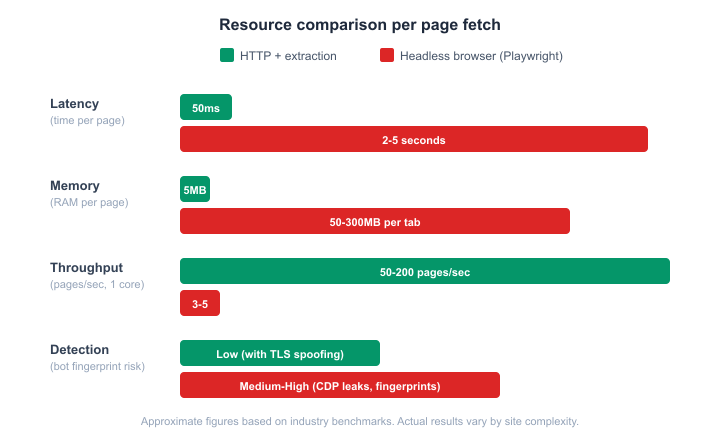 Performance comparison: HTTP + extraction vs headless browser
The gap isn't subtle.
Latency — An HTTP request plus content extraction takes around 50ms for the extraction step (network latency depends on the target, obviously). A Playwright page load needs 2-5 seconds to launch the browser context, navigate, wait for network idle, and extract the DOM3.
Memory — A bare Chrome tab starts at 30-50MB of private memory. Load a content-heavy page with tracking scripts and ad containers and you're looking at 200-300MB per tab4. An HTTP response sitting in a Python string? Maybe 5MB for a large page, including the parsed lxml tree.
Throughput — On a single core, HTTP-based extraction can process 50-200 pages per second depending on network conditions and extraction complexity. Playwright caps out at 3-5 pages per second with careful concurrency tuning5. That's not a 2x difference. It's 40x.
Cost — At cloud rates, this matters. A 4GB VPS can comfortably run an HTTP extraction pipeline at hundreds of pages per second. That same VPS might handle 4-6 concurrent Playwright tabs before it starts swapping. Want to scrape a million pages? With HTTP extraction, that's a few hours on a cheap server. With Playwright, you're looking at a cluster.
The detection angle
Here's something that doesn't get discussed enough: headless browsers are easier to detect than well-crafted HTTP requests.
Playwright and Puppeteer communicate with Chrome through the Chrome DevTools Protocol (CDP). Anti-bot systems like Cloudflare and DataDome can detect CDP's side effects — injected global variables like window.__playwright__binding__, specific patterns in the WebSocket connection, and behavioral fingerprints that automation frameworks leave behind6.
A raw HTTP request, by contrast, has a much smaller fingerprint surface. The main detection vector is TLS fingerprinting — the JA3/JA4 hash generated during the TLS handshake7. Python's requests library produces a JA3 hash that looks nothing like Chrome's. But libraries like curl_cffi can impersonate browser TLS fingerprints, and at that point, your HTTP request is virtually indistinguishable from a real browser visit8.
Anti-bot services have gotten good at fingerprinting headless browsers. They haven't gotten nearly as good at fingerprinting well-configured HTTP clients.
The decision tree
Not every page can be scraped with HTTP. Here's a practical way to figure out which approach you need:
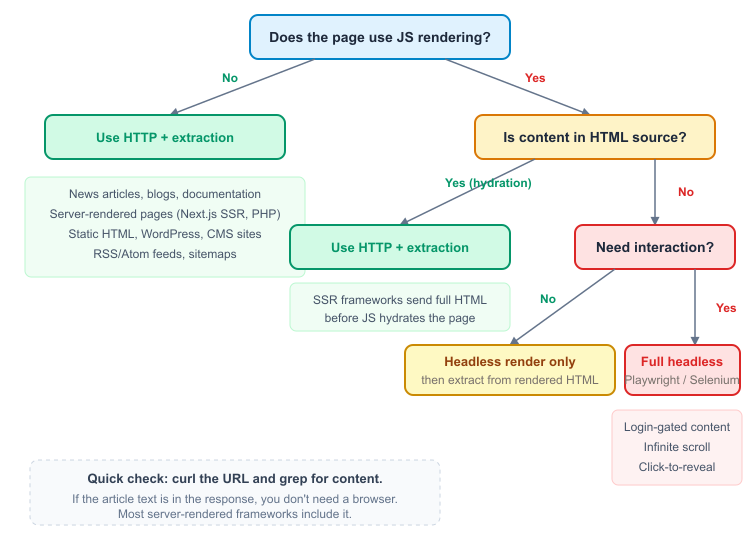 When to use HTTP extraction vs headless browser
The quick test: curl the URL and search the response for a sentence you can see on the rendered page. If it's there, you don't need a browser. This takes ten seconds and I'm continually amazed how many people skip it.
Static HTML — News sites, blogs, documentation, WordPress, most CMS-driven pages. HTTP + extraction. Done.
SSR frameworks — Next.js, Nuxt, SvelteKit, Astro in SSR mode. The HTML response contains the full content. JavaScript hydrates it for interactivity, but the text is already there. HTTP + extraction works.
Client-side rendered SPAs — True single-page apps where the initial HTML is an empty <div id="root"> and all content loads via JavaScript API calls. This is where you actually need a headless browser — or, if you're clever, you intercept the API calls directly and skip the browser entirely.
Interaction-dependent content — Login walls, infinite scroll, click-to-expand sections, CAPTCHA-gated pages. Full headless browser, no shortcut.
When headless IS the right call
I'm not arguing against Playwright or Selenium — they're excellent tools. But they solve a specific class of problems, and reaching for them by default is like driving a truck to the corner store.
You genuinely need a headless browser when:
The content doesn't exist in the HTML source. True SPAs built with React (client-side only), Angular, or Vue in SPA mode serve an empty shell. The content arrives via XHR/fetch calls after JavaScript executes. No browser, no content. (Though if you can identify those API endpoints, hitting them directly with HTTP is still faster.)
Authentication requires browser interaction. OAuth flows, multi-step logins, session cookies that depend on JavaScript execution — these often need a real browser context. You can sometimes replicate the cookie flow with HTTP requests, but it's fragile and breaks when the site updates.
The page requires user interaction. Infinite scroll, "load more" buttons, content behind tabs — anything where the server only sends content in response to DOM events.
Anti-bot detection is aggressive and session-based. Some sites won't serve content without a full browser fingerprint that passes Cloudflare's JS challenge or similar. Even here, a combined pipeline — using Playwright to render the page, then passing the HTML to a content extractor — is often smarter than trying to parse the DOM inside the browser.
The hybrid approach
The best scraping architectures don't pick one or the other. They start with HTTP and escalate to headless only when needed.
Crawlee, the scraping framework from Apify, makes this pattern explicit. You write your crawler logic once, then swap between CheerioCrawler (HTTP + Cheerio parsing) and PlaywrightCrawler depending on the target9. Same interface, different engine. Start with HTTP, switch to Playwright for the pages that need it.
Contextractor does something similar at the extraction level. It runs Trafilatura for content extraction — no browser dependency, pure HTTP and HTML parsing10. For sites that require JavaScript rendering, you pair it with a headless browser that fetches the rendered HTML, then Trafilatura extracts the content from that. The browser renders; the extractor extracts. Each tool does what it's good at.
This is cheaper than running Playwright for everything, and the extraction quality is better too — Trafilatura's heuristic pipeline scored an F1 of 0.958 in the ScrapingHub benchmark11, which is hard to beat with ad-hoc DOM querying inside a browser.
The cost of defaulting to headless
Think about what a headless browser actually does when you load a page. It parses HTML into a DOM tree, builds a render tree, computes layout, executes every <script> tag (including analytics, ads, tracking pixels), fetches every image, stylesheet, and font, runs requestAnimationFrame callbacks, fires timers, resolves promises. All of this happens so that a human could see pixels on a screen.
But you're not a human. You want the article text.
Every byte of JavaScript that executes in that browser tab — the cookie consent modal, the A/B testing script, the social share widgets — is work your scraper is paying for in CPU cycles and memory that produces nothing useful. The median web page ships 558KB of JavaScript on mobile12. Most of it is irrelevant to the content you're after.
An HTTP GET followed by content extraction skips all of that. You get the HTML, extract the text, move on. The page's JavaScript never executes, which means there's nothing for anti-bot scripts to fingerprint either.
A practical test
Next time you're about to set up a Playwright scraper, try this first:
curl -s "https://target-site.com/article" | grep -c "some phrase from the article"
If the count is greater than zero, the content is in the HTTP response. You can extract it without a browser. For the extraction step, tools like Trafilatura, Readability, or Contextractor will pull clean text out of the raw HTML with F1 scores above 0.9513.
If the count is zero, check the network tab in your browser's DevTools. The content might be loaded from a JSON API endpoint — in which case you can hit that endpoint directly with HTTP and skip the browser altogether. Only if the content is truly generated client-side with no inspectable API call do you need the full headless approach.
You'd be surprised how rarely that last case comes up for content extraction workloads.
Citations
-
Puppeteer GitHub: System memory usage increase with headless Chrome. Retrieved March 27, 2026 ↩
-
W3Techs: Usage statistics of WordPress. Retrieved March 27, 2026 ↩
-
TestDino: Performance Benchmarks of Playwright, Cypress, and Selenium in 2026. Retrieved March 27, 2026 ↩
-
Chromium: Building headless for minimum cpu+mem usage. Retrieved March 27, 2026 ↩
-
Hacker News: Headless browsers use about 100x more RAM. Retrieved March 27, 2026 ↩
-
Castle: How to detect Headless Chrome bots instrumented with Playwright. Retrieved March 27, 2026 ↩
-
Browserless: TLS Fingerprinting: How It Works and How to Bypass It. Retrieved March 27, 2026 ↩
-
curl_cffi: Python bindings for curl-impersonate. Retrieved March 27, 2026 ↩
-
Crawlee: Quick Start documentation. Retrieved March 27, 2026 ↩
-
Adrien Barbaresi: Trafilatura: A Web Scraping Library and Command-Line Tool for Text Discovery and Extraction. Proceedings of ACL-IJCNLP 2021: System Demonstrations, pp. 122-131 ↩
-
Trafilatura: Evaluation and benchmarks. Retrieved March 27, 2026 ↩
-
HTTP Archive: JavaScript - 2024 Web Almanac. Retrieved March 27, 2026 ↩
-
Janek Bevendorff, Sanket Gupta, Johannes Kiesel, Benno Stein: An Empirical Comparison of Web Content Extraction Algorithms. Proceedings of SIGIR 2023 ↩
Updated: March 23, 2026