
HTML to Markdown for AI — comparing 8 conversion approaches
Feed raw HTML into an LLM and watch your token count explode. A typical news article page weighs around 150KB of markup, but the actual content — the part you want the model to reason about — might be 10KB of text. The rest is navigation, ad containers, tracking scripts, cookie banners, and footer boilerplate. That's roughly 38,000 tokens of noise for maybe 3,000 tokens of signal1.
So everyone converts to Markdown first. Makes sense — Markdown strips the visual presentation cruft while preserving semantic structure (headings, lists, links, tables). LLMs handle it well because a huge chunk of their training data came from GitHub and Stack Overflow, where Markdown is the native format2.
But "convert HTML to Markdown" isn't one problem. It's at least four different problems dressed in the same coat, and the right tool depends on which one you're actually solving.
The four problems
Problem one: faithful format conversion. You have clean HTML and want it as Markdown. Maybe you're converting documentation, CMS output, or email templates. The HTML is well-structured and you want all of it — every heading, table, code block, and link — preserved in Markdown syntax.
Problem two: content extraction with Markdown output. You have a raw web page and you want just the article text, not the navigation and sidebars. The conversion to Markdown is secondary; the real work is figuring out what's content and what's boilerplate. This is the content extraction problem, and it's a different beast entirely.
Problem three: structured data extraction. You want specific fields — price, title, author, date — pulled out of HTML and returned as JSON or a schema. Markdown is just an intermediate step here.
Problem four: at-scale web-to-LLM pipelines. You need to fetch pages, handle JavaScript rendering, deal with anti-bot measures, and produce clean Markdown — hundreds or thousands of pages per hour.
Most people building RAG pipelines or LLM data preparation workflows are dealing with problem two or four. But they often reach for tools designed for problem one, and then wonder why their retrieval quality is garbage.
Rule-based converters
These handle problem one. Give them HTML, get Markdown. No content extraction, no boilerplate removal — they convert everything they receive.
Turndown
Turndown is the de facto standard for HTML-to-Markdown in JavaScript3. Originally called to-markdown, it was rewritten and renamed around 2017. MIT licensed, works in both Node.js and browsers, 2.7 million weekly npm downloads, ~10,800 GitHub stars.
The plugin system is its killer feature. The core handles standard HTML elements, then turndown-plugin-gfm adds GitHub Flavored Markdown support — tables, strikethrough, task lists. You can write custom rules for any element:
turndownService.addRule('highlight', {
  filter: 'mark',
  replacement: function(content) {
    return '==' + content + '==';
  }
});
Tables come out clean. Code blocks preserve language hints from class="language-python" attributes. It's fast — sub-millisecond for typical pages.
The catch: it converts everything. Hand it a full web page and you'll get the nav menu, the sidebar, the footer, all as Markdown. That's not a bug; it's by design. Turndown is a format converter, not a content extractor.
markdownify
markdownify is Python's answer to Turndown4. Built on BeautifulSoup, MIT licensed, straightforward API. markdownify('some html') and you're done.
It handles the basics well — headings, bold, italic, links, images, lists. Table support exists but it's less polished than Turndown's GFM plugin. Code blocks work, though language detection from class attributes can be inconsistent.
Where it shines is extensibility for Python developers. You subclass MarkdownConverter and override convert_tagname methods for custom handling. If your pipeline is already Python-based (and it probably is, given how the ML ecosystem works), markdownify slots in with zero friction.
html-to-markdown (Go)
Johannes Kaufmann's html-to-markdown library deserves a mention because it's genuinely fast5. Written in Go, it processes HTML-to-Markdown conversion faster than anything in the JavaScript or Python ecosystems — which matters if you're doing batch conversion at scale.
It supports CommonMark and GFM output, handles tables and code blocks, and ships as both a library and CLI tool. If you're building Go services or want a performant CLI for batch jobs, this is the one.
Content extractors with Markdown output
These solve problem two — they figure out where the article is, strip the boilerplate, and give you the extracted text. Some can output Markdown.
Trafilatura
Trafilatura is the highest-scoring open-source content extractor across independent benchmarks, with an F1 of 0.958 on the ScrapingHub benchmark6. It's a content extractor first, but it supports Markdown as one of seven output formats — and that Markdown output is what makes it interesting for LLM pipelines.
The extraction pipeline uses heuristic scoring (text density, link density) with a fallback chain: its own algorithm first, then readability-lxml, then jusText. The best result wins7. Set output_format='markdown' and you get headings and lists preserved in Markdown syntax, with all the navigation and boilerplate already stripped.
The trade-off is that extraction can be lossy. Trafilatura is optimized for article-type pages. Tables sometimes get simplified or dropped. Code blocks may lose formatting. That's inherent to the extraction approach — the algorithm is making judgments about what's "content" and what isn't, and complex embedded elements can fall on the wrong side.
For most RAG use cases, that trade-off is worth it. You're getting 3,000 tokens of clean article text instead of 38,000 tokens of HTML soup.
Readability + converter
Mozilla's Readability algorithm (the one behind Firefox Reader View) extracts the main content block from a web page. It doesn't output Markdown directly, but the pattern of Readability-then-Turndown is common enough that it deserves its own mention.
The idea: Readability strips the page down to the article HTML, then Turndown converts that clean HTML to Markdown. You get content extraction and faithful format conversion — but in two steps, from two libraries, with two different failure modes.
I've seen this work well for news articles and blog posts. It breaks down on pages with unusual layouts, heavy JavaScript rendering, or content spread across multiple DOM regions.
ML-powered conversion
Jina ReaderLM-v2
This is the genuinely novel approach. ReaderLM-v2 is a 1.54-billion-parameter language model, fine-tuned on Qwen2.5-1.5B-Instruct, that treats HTML-to-Markdown as a translation task rather than a rule-based transformation8. Released January 15, 2025, it handles up to 512K tokens of combined input/output and supports 29 languages.
The results are striking. On HTML-to-Markdown benchmarks, ReaderLM-v2 achieved a ROUGE-L of 0.86 — outperforming GPT-4o (0.69), Gemini 2.0 Flash (0.69), and Qwen2.5-32B (0.71)8. It handles complex nested structures, LaTeX equations, and code fences better than rule-based converters because it "understands" the intent behind the markup rather than pattern-matching tags.
It also does HTML-to-JSON extraction with schema support, which is problem three from the list above.
The downsides are obvious: it needs a GPU (or at least quantized inference on a decent CPU), it's orders of magnitude slower than rule-based conversion, and you can't customize handling of specific elements the way you can with Turndown plugins. For batch processing thousands of pages, the economics don't work unless you have spare GPU capacity.
Jina also offers this through their Reader API (r.jina.ai), which avoids the GPU problem but adds latency and cost.
Full-service APIs
These tackle problem four — the full pipeline from URL to LLM-ready Markdown, including fetching, JavaScript rendering, anti-bot handling, and conversion.
Firecrawl
Firecrawl pitches itself as "the web data API for AI" and that's a reasonable description9. You give it a URL, it handles JavaScript rendering, waits for dynamic content, strips the boilerplate, and returns clean Markdown. It also does site-level crawling (following links), search (finding relevant pages), and structured data extraction with LLM-powered schemas.
Pricing uses a credit system: Hobby at $16/month gets 3,000 credits, Standard at $83/month gets 100,000, Growth at $333/month gets 500,00010. Basic scraping costs 1 credit per page. But the credit multiplier catches people — AI-powered extraction eats 5+ credits per page, so your effective page count can be 5x lower than the headline number.
The Markdown output quality is solid. Tables, code blocks, and semantic elements come through well. The real value is the managed infrastructure — you don't need to run headless browsers, maintain proxy pools, or handle CAPTCHAs.
There's a self-hosted open-source option too, which is a nice escape hatch.
ScrapingAnt
ScrapingAnt added a Markdown transformation endpoint specifically for LLM use cases11. It's primarily a web scraping API — proxy rotation, JavaScript rendering, anti-bot measures — and Markdown output is one feature in that stack.
Pricing starts with a free tier of 10,000 API credits per month, then $19/month for 100,000 credits (Enthusiast), $49/month for 500,000 (Startup), and $249/month for 3,000,000 (Business)12. Credits scale with complexity: a basic request costs 1 credit, JavaScript rendering costs 10, residential proxies cost 50, and combining both costs 250.
The Markdown output is fine for content ingestion but less refined than Firecrawl's when it comes to preserving complex formatting. ScrapingAnt's strengths are in the scraping infrastructure — if you need proxy diversity and anti-bot handling, it's a capable option that happens to also produce Markdown.
Hybrid: Crawl4AI
Crawl4AI is hard to categorize because it does a bit of everything. It's an open-source Python library (Apache 2.0) with 50,000+ GitHub stars that combines a Playwright-based crawler with HTML-to-Markdown conversion and optional LLM-powered extraction13.
The DefaultMarkdownGenerator handles the HTML-to-Markdown conversion, preserving headings, code blocks, and lists. What makes it interesting is the filtering layer on top. PruningContentFilter does heuristic boilerplate removal (text density scoring, similar to what Trafilatura does). BM25ContentFilter does query-focused extraction — give it a query and it returns the most relevant sections. And LLMContentFilter uses an AI model to intelligently filter content.
The output comes in two forms: raw Markdown (full conversion) and "fit Markdown" (filtered version with boilerplate stripped). For RAG pipelines, the fit Markdown is usually what you want.
Crawl4AI ships an MCP server, which means AI agents can call it directly as a tool — a pattern that's becoming standard in 2026 for web-connected LLM workflows.
The catch is that it bundles Playwright, so it's heavy. You're running a full browser engine. That's fine for hundreds of pages; it's expensive for millions.
Token efficiency
The whole point of converting HTML to Markdown is reducing token count. Here's how the approaches compare on a typical news article (2,000 words of content in 150KB of HTML):
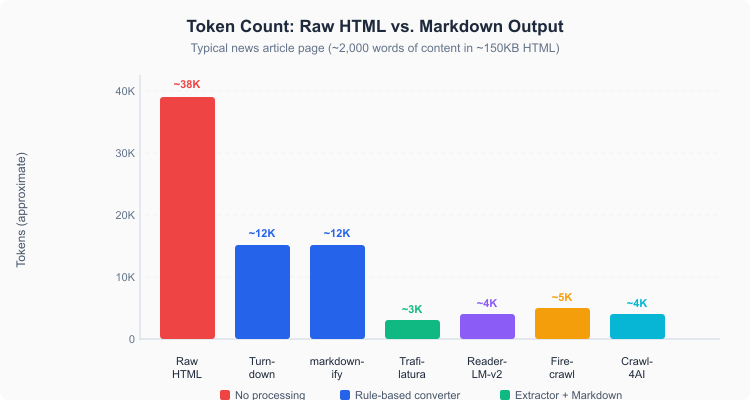 Token counts across conversion approaches for a typical news article
| Approach | Approximate tokens | Reduction vs. raw HTML |
|---|---|---|
| Raw HTML | ~38,000 | — |
| Turndown / markdownify | ~12,000 | ~68% |
| Trafilatura (Markdown output) | ~3,000 | ~92% |
| ReaderLM-v2 | ~4,000 | ~89% |
| Firecrawl | ~5,000 | ~87% |
| Crawl4AI (fit Markdown) | ~4,000 | ~89% |
The rule-based converters cut tokens by about two-thirds, which sounds great until you realize most of what's left is still boilerplate — navigation links in Markdown syntax are still navigation links. The extractors get you to 90%+ reduction because they throw away the boilerplate before converting.
That gap matters for cost. At GPT-4o's pricing, processing 10,000 pages through raw HTML would cost roughly $19 in input tokens. Through Turndown, about $6. Through Trafilatura's Markdown output, about $1.50. Over millions of pages, extractors save real money.
The comparison
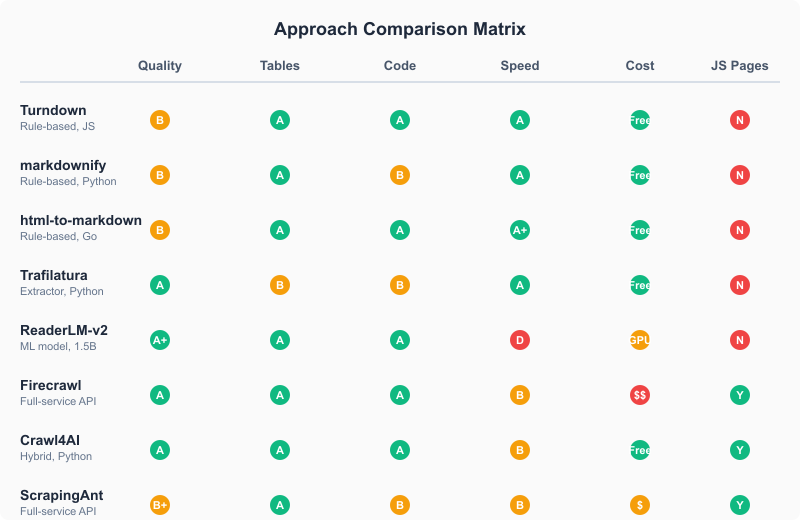 Feature comparison across all approaches
| Tool | Type | Language | Tables | Code blocks | JS pages | License | Cost |
|---|---|---|---|---|---|---|---|
| Turndown | Rule-based | JS | GFM plugin | Yes | No | MIT | Free |
| markdownify | Rule-based | Python | Basic | Partial | No | MIT | Free |
| html-to-markdown | Rule-based | Go | GFM | Yes | No | MIT | Free |
| Trafilatura | Extractor | Python | Limited | Limited | No | Apache 2.0 | Free |
| Readability + converter | Extractor + rule | JS | Via converter | Via converter | No | Apache 2.0 / MIT | Free |
| ReaderLM-v2 | ML model | Python | Yes | Yes | No | Apache 2.0 | GPU / API |
| Firecrawl | Full-service API | Any (API) | Yes | Yes | Yes | AGPL / SaaS | $16-333/mo |
| Crawl4AI | Hybrid | Python | Yes | Yes | Yes | Apache 2.0 | Free (self-hosted) |
| ScrapingAnt | Full-service API | Any (API) | Yes | Partial | Yes | SaaS | $0-249/mo |
When to use what
I think most people overthink this. Here's how I'd decide:
You already have clean HTML (CMS output, documentation, email) — use Turndown (JS) or markdownify (Python). They're fast, free, and handle the format conversion perfectly.
You have raw web pages and want article text for RAG — use Trafilatura with output_format='markdown'. It's the best extractor, it's free, and the Markdown output is good enough for chunking and embedding. Contextractor wraps Trafilatura with a production API if you don't want to run it yourself.
You need JavaScript-rendered pages — use Crawl4AI (self-hosted, free) or Firecrawl (managed, paid). Both run headless browsers and handle dynamic content. Crawl4AI is better if you want control; Firecrawl is better if you want convenience.
You need maximum Markdown fidelity on complex pages with LaTeX, nested tables, and unusual formatting — ReaderLM-v2 produces the cleanest output, but the GPU requirement and speed penalty make it impractical for batch work. Try the Jina Reader API for one-off conversions.
You need anti-bot handling and proxy infrastructure — ScrapingAnt or Firecrawl. That's an infrastructure problem, not a conversion problem, and these services solve it.
The one thing I'd strongly recommend against: using a rule-based converter on raw web pages and feeding the result to an LLM. You'll tokenize every nav link, every sidebar widget, every cookie banner — and your model's attention will be spread across garbage. Extract first, convert second. Or use a tool that does both.
Citations
-
An Index-based Approach for Efficient and Effective Web Content Extraction. arXiv, December 2025 ↩
-
Craft Markdown: Why LLMs Love Markdown. Retrieved March 27, 2026 ↩
-
Turndown: HTML to Markdown converter. Retrieved March 27, 2026 ↩
-
markdownify: Convert HTML to Markdown. Retrieved March 27, 2026 ↩
-
Johannes Kaufmann: html-to-markdown. Retrieved March 27, 2026 ↩
-
Adrien Barbaresi: Trafilatura: A Web Scraping Library and Command-Line Tool for Text Discovery and Extraction. Proceedings of ACL-IJCNLP 2021: System Demonstrations, pp. 122-131 ↩
-
Trafilatura: Documentation. Retrieved March 27, 2026 ↩
-
Jina AI: ReaderLM v2: Frontier Small Language Model for HTML to Markdown and JSON. Retrieved March 27, 2026 ↩ ↩2
-
Firecrawl: Documentation. Retrieved March 27, 2026 ↩
-
ScrapingAnt: Markdown Transformation Endpoint. Retrieved March 27, 2026 ↩
-
ScrapingAnt: Credit cost for your requests. Retrieved March 27, 2026 ↩
-
Crawl4AI: Markdown Generation Documentation. Retrieved March 27, 2026 ↩
Updated: March 24, 2026