
MCP and web extraction — connecting scrapers to AI agents
Before the Model Context Protocol existed, connecting an AI agent to a web scraper meant writing custom glue code. You'd build a function, register it as a tool in whatever framework you were using, handle serialization, manage errors, and hope the next agent framework wouldn't need a completely different integration. Every tool was a snowflake.
MCP changed that. Anthropic open-sourced it in November 2024 as a standard protocol for connecting AI applications to external tools and data sources1. The pitch was simple: one protocol, any tool, any AI host. Sixteen months later, it's the de facto standard — OpenAI adopted it across the Agents SDK and ChatGPT desktop in March 20252, Google DeepMind followed in April3, and by December 2025, Anthropic donated the whole thing to the Linux Foundation's Agentic AI Foundation for vendor-neutral governance4.
For web extraction specifically, MCP is exactly what was missing. An AI agent can now discover, call, and consume results from any extraction tool — Firecrawl, Apify, a custom scraper — without either side knowing anything about the other's internals.
What MCP actually is
At the protocol level, MCP is surprisingly straightforward. It's JSON-RPC 2.0 over one of two transports: stdio (for local processes) or Streamable HTTP (for remote servers)5. That's it. No protobuf, no GraphQL, no custom binary format.
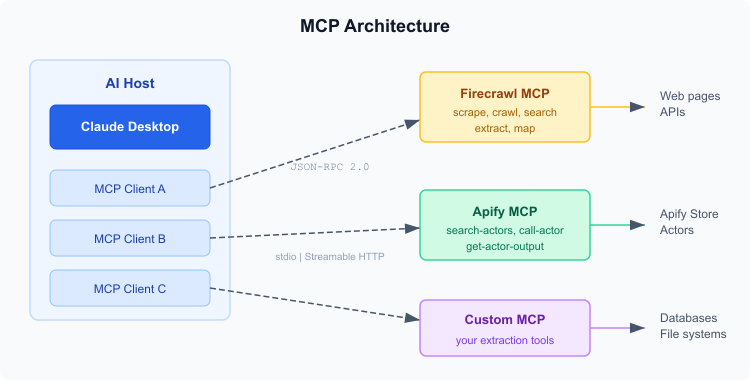 MCP architecture — one host, multiple clients, multiple servers
The architecture has three roles:
Host — the AI application. Claude Desktop, Cursor, VS Code with GitHub Copilot, Claude Code. The host creates one MCP client per server connection.
Client — a component inside the host that maintains a single connection to one MCP server. Handles capability negotiation, tool discovery, and request routing.
Server — a program that exposes tools, resources, and prompts via the protocol. Can run locally (spawned as a child process over stdio) or remotely (HTTP endpoint). The server doesn't know or care which AI model is calling it.
The handshake is a capability negotiation. Client sends initialize with its supported features, server responds with what it offers — tools, resources, prompts. After that, the client can call tools/list to discover available operations, then tools/call to execute them. Each tool has a name, description, and a JSON Schema for its input parameters5.
What I find clever about the design: servers can send notifications/tools/list_changed when their tool set changes dynamically. An Apify MCP server could add a new Actor as a tool at runtime, and the host would pick it up without reconnecting. Most tool-calling frameworks don't handle that.
Building an MCP server for extraction
The TypeScript SDK makes this pretty minimal6. Here's the skeleton of an MCP server that wraps a content extraction function:
import { McpServer } from "@modelcontextprotocol/sdk/server/mcp.js";
import { StdioServerTransport } from "@modelcontextprotocol/sdk/server/stdio.js";
import { z } from "zod";

const server = new McpServer({
  name: "content-extractor",
  version: "1.0.0",
});

server.registerTool(
  "extract_content",
  {
    title: "Extract Content",
    description: "Extract main text content from a URL, stripping navigation, ads, and boilerplate",
    inputSchema: z.object({
      url: z.string().url(),
      format: z.enum(["markdown", "text", "html"]).default("markdown"),
    }),
  },
  async ({ url, format }) => {
    const html = await fetch(url).then((r) => r.text());
    const content = extractMainContent(html, format); // your extraction logic
    return {
      content: [{ type: "text", text: content }],
    };
  }
);

const transport = new StdioServerTransport();
await server.connect(transport);
That's a functional MCP server. Any host that speaks the protocol — Claude Desktop, Cursor, Claude Code — can discover the extract_content tool, see its parameter schema, and call it. The host doesn't need to know you're using Trafilatura under the hood, or Readability, or a custom heuristic. It just sends a URL and gets clean text back.
For remote deployment, swap StdioServerTransport for Streamable HTTP and wire it into Express or whatever HTTP framework you prefer. The protocol messages stay the same.
Firecrawl's MCP server
Firecrawl ships a first-party MCP server that's probably the quickest way to give an AI agent web scraping capabilities7. It exposes twelve tools — scrape, crawl, search, map, extract, plus a set of browser session management tools for persistent CDP connections.
The setup for Claude Desktop is a one-liner:
{
  "mcpServers": {
    "firecrawl": {
      "url": "https://mcp.firecrawl.dev/v2/mcp",
      "headers": { "Authorization": "Bearer YOUR_API_KEY" }
    }
  }
}
For Cursor (0.48.6+), it's similar — add the server in Settings > Features > MCP Servers, or run npx -y firecrawl-mcp locally with your API key as an environment variable.
The interesting bit is the extract tool. It uses LLM-powered schema extraction — you pass a JSON schema describing what you want, and Firecrawl returns structured data matching that schema. So instead of getting a blob of Markdown and parsing it yourself, you can ask for { "title": string, "author": string, "publishDate": string } and get exactly that. The agent can define the schema on the fly based on what the user asked for.
There's also an agent tool for autonomous research — it takes a natural language prompt, goes off and finds relevant pages, extracts content from multiple sources, and returns a consolidated result. That's agents calling agents, which feels a bit recursive but works well for research tasks where you don't know the URLs upfront.
The free tier gives you 10 scrapes per minute. No credit card.
Apify's MCP server
Apify took a different approach. Instead of exposing a fixed set of scraping tools, their MCP server gives AI agents access to the entire Apify Store — thousands of pre-built Actors for specific extraction tasks8.
The workflow is dynamic:
- Agent calls
search-actorsto find relevant scrapers (say, "Instagram profile scraper") - Agent inspects the Actor's input/output schema
- Agent calls
add-actorto register that Actor as a new MCP tool - Agent calls the newly added tool with appropriate parameters
- Agent retrieves results via
get-actor-output
This is where the notifications/tools/list_changed capability pays off. When the agent adds an Actor, the tool list actually changes, and the host gets notified.
The hosted version runs at https://mcp.apify.com with OAuth or bearer token auth. Clients that support dynamic tool discovery (Claude.ai web, VS Code) automatically get the add-actor tool instead of a static call-actor, which makes the discovery flow more natural8.
For Claude Desktop locally:
{
  "mcpServers": {
    "apify": {
      "command": "npx",
      "args": ["-y", "@apify/actors-mcp-server"],
      "env": { "APIFY_TOKEN": "YOUR_TOKEN" }
    }
  }
}
I think Apify's approach is more powerful for specialized extraction. Firecrawl gives you general-purpose scraping out of the box. Apify gives the agent an entire marketplace — need to scrape Google Maps? There's an Actor. Amazon product data? Actor. TikTok comments? Actor. The agent discovers and wires it up at runtime, which is how tool use in AI agents should probably work long-term.
The agent-driven extraction pattern
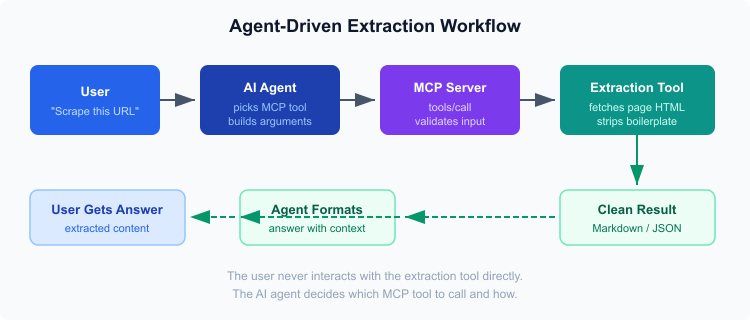 How an extraction request flows through MCP
Here's what makes MCP-based extraction different from traditional scraping pipelines: the human doesn't configure anything. They just ask a question.
"What did the CEO say in that blog post?" The agent figures out it needs to scrape a URL, picks the right MCP tool (maybe Firecrawl's scrape, maybe an Apify Actor), constructs the arguments, calls the tool, gets clean Markdown back, and answers the question with the extracted content as context.
The MCP server handles the messy parts — fetching HTML, dealing with JavaScript rendering if needed, stripping boilerplate, returning clean text. The agent handles the reasoning — which tool to use, what parameters to pass, how to incorporate the results into its response.
This is fundamentally different from building a scraping pipeline. There's no ETL. No cron jobs. No data warehouse. The extraction happens on demand, driven by what the agent needs right now for the conversation it's in.
It's also composable. An agent with both Firecrawl and Apify MCP servers can pick whichever is better for a given task. General article? Firecrawl scrape. Structured product data from a specific platform? Apify Actor. The agent makes the choice based on the tool descriptions and input schemas it discovered during initialization.
How hosts consume MCP tools
The major AI development environments all support MCP now, though the depth of integration varies.
Claude Desktop was first (it shipped with MCP support at launch in November 2024). Configuration lives in claude_desktop_config.json — you list your servers, and Claude discovers their tools at startup. Supports both stdio and Streamable HTTP transports.
Cursor added MCP in version 0.45.6 (early 2025). Settings > Features > MCP Servers. The AI assistant in Cursor can call MCP tools during code generation — ask it to "scrape the API docs at this URL and generate TypeScript types" and it'll use a connected extraction server to pull the docs, then generate code from the content.
VS Code with GitHub Copilot supports MCP servers through the Copilot agent framework. Dynamic tool discovery works here — the agent can browse available tools and pick the right one without the user specifying which server to use.
Claude Code (the CLI) supports MCP via claude mcp add. Handy for automation scripts and CI/CD pipelines where you want an AI agent to extract content as part of a build process.
The pattern across all of them is the same: configure once, use forever. The host handles connection lifecycle, capability negotiation, and tool routing. The user just talks to the AI.
Where this is going
MCP hit 97 million monthly SDK downloads by late 20253. The November 2025 spec revision added async operations, statelessness options, and a community registry for discovering servers9. Anthropic, OpenAI, and Block co-founded the Agentic AI Foundation in December 2025 to ensure vendor-neutral governance4.
For web extraction specifically, I expect the pattern to shift from "human configures a scraping pipeline" to "agent picks the right extraction tool at runtime." Contextractor already uses Trafilatura as its extraction engine — wrapping that behind an MCP server is trivial, and suddenly any MCP-compatible agent can use it.
The bigger question is whether extraction-as-a-tool will change how people build RAG pipelines. Right now, most RAG systems batch-process documents ahead of time. With MCP, an agent could extract content on the fly during a conversation — no pre-indexing, no stale data. That's a different architecture entirely, and I suspect it's where things are headed for anything that doesn't need sub-second retrieval.
Citations
-
Anthropic: Introducing the Model Context Protocol. Retrieved March 27, 2026 ↩
-
OpenAI: Agentic AI Foundation. Retrieved March 27, 2026 ↩
-
Pento: A Year of MCP: From Internal Experiment to Industry Standard. Retrieved March 27, 2026 ↩ ↩2
-
Anthropic: Donating the Model Context Protocol and establishing the Agentic AI Foundation. Retrieved March 27, 2026 ↩ ↩2
-
Model Context Protocol: Specification. Retrieved March 27, 2026 ↩ ↩2
-
Model Context Protocol: TypeScript SDK. Retrieved March 27, 2026 ↩
-
Firecrawl: MCP Server Documentation. Retrieved March 27, 2026 ↩
-
Apify: MCP Server Integration. Retrieved March 27, 2026 ↩ ↩2
-
Model Context Protocol Blog: One Year of MCP: November 2025 Spec Release. Retrieved March 27, 2026 ↩
Updated: March 26, 2026