
Building a RAG pipeline with clean web data
Every RAG tutorial starts the same way. Download some PDFs, split them into chunks, embed them, throw them in a vector database, done. Retrieval-Augmented Generation in twenty lines of Python.
The problem is that real-world RAG systems don't run on curated PDFs. They run on web pages — messy, boilerplate-heavy, JavaScript-rendered web pages where the actual article text is buried under navigation bars, cookie consent modals, ad containers, newsletter signup forms, and footer links. A typical news page has maybe 2,000 words of useful content inside 150KB of HTML markup that's structurally irrelevant to the topic.
If you skip the extraction step — if you just strip HTML tags and dump the text into your chunker — you're embedding noise. And that noise doesn't just sit quietly in your vector store. It actively degrades retrieval quality for every query.
I've seen teams spend weeks tuning their embedding model or experimenting with rerankers when the actual problem was upstream: their chunks were contaminated with boilerplate from the very first stage.
The pipeline
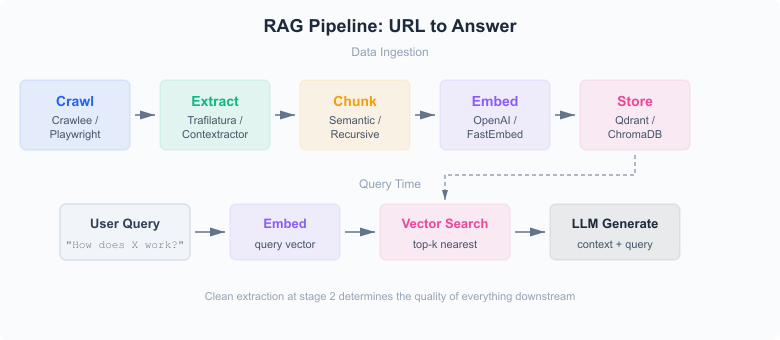 Full RAG pipeline architecture showing ingestion and query stages
Six stages, each feeding the next. Crawl the pages, extract the content, chunk the text, generate embeddings, store vectors, retrieve at query time. The extraction step is the one that determines the quality ceiling for everything downstream.
Here's each stage with working Python code.
Crawling with Crawlee
Crawlee is a web scraping framework from Apify — originally Node.js/TypeScript only, but there's a Python port now1. It handles the ugly parts of crawling: request queuing, retry logic, concurrency management, proxy rotation, and session handling.
For RAG ingestion, you typically want the BeautifulSoupCrawler for static pages and PlaywrightCrawler for anything that needs JavaScript rendering (React SPAs, dynamically loaded content):
from crawlee.crawlers import BeautifulSoupCrawler, BeautifulSoupCrawlingContext

crawler = BeautifulSoupCrawler(max_requests_per_crawl=100)

@crawler.router.default_handler
async def handle(context: BeautifulSoupCrawlingContext) -> None:
    # context.soup is the parsed HTML
    raw_html = str(context.soup)
    url = context.request.url

    # pass raw_html to extraction stage
    await extract_and_store(url, raw_html)

    # follow links within the same domain
    await context.enqueue_links(strategy="same-domain")

await crawler.run(["https://docs.example.com/"])
The max_requests_per_crawl parameter is your safety net — without it, following links on a large docs site can snowball into tens of thousands of requests. Start small, verify the output, scale up.
For JavaScript-heavy sites, swap BeautifulSoupCrawler for PlaywrightCrawler. Same interface, different engine. It launches a headless Chromium browser behind the scenes, waits for rendering, then hands you the fully hydrated DOM.
Content extraction
This is where most RAG pipelines fail. Or rather, where they never try.
The naive approach — BeautifulSoup(html).get_text() — strips tags and gives you a wall of text where navigation labels, cookie notices, sidebar widgets, and footer legalese are all mashed together with the actual article content. That text looks fine to a human glancing at it. But embed it, and your vector space becomes a mess.
Content extraction is a distinct problem from web scraping. You're not writing CSS selectors for known page structures. You're handing the algorithm a page it's never seen and asking it to figure out where the article is.
Trafilatura is the best open-source tool for this right now — F1 of 0.958 on the ScrapingHub benchmark, highest mean F1 across eight datasets in the SIGIR 2023 evaluation2. It runs a heuristic pipeline: parse HTML into an lxml tree, prune elements that are almost never content (<nav>, <footer>, <aside>, known ad classes), score remaining nodes by text density and link density, then select the highest-scoring region3.
from trafilatura import extract

def extract_content(raw_html: str, url: str) -> dict | None:
    text = extract(
        raw_html,
        output_format="txt",
        include_links=False,
        include_comments=False,
        favor_precision=True,
        url=url,
    )
    if not text or len(text) < 100:
        return None

    markdown = extract(
        raw_html,
        output_format="markdown",
        include_links=True,
        include_comments=False,
        favor_precision=True,
        url=url,
    )
    return {"text": text, "markdown": markdown, "url": url}
I extract twice here — once as plain text (for embedding), once as Markdown (for the LLM context window, where preserving headings and structure helps). The favor_precision=True flag tells Trafilatura to be aggressive about filtering; you lose some edge-case content but the output is much cleaner.
The len(text) < 100 check is crude but effective. Pages that yield fewer than 100 characters after extraction are almost always navigation pages, login screens, or error pages — not worth indexing.
For a hosted alternative that wraps Trafilatura with a crawling layer, Contextractor gives you an API endpoint: URL in, clean text out, with multiple output formats including Markdown and plain text.
Chunking
Chunking is where you split extracted text into pieces small enough for an embedding model to handle, but large enough to carry meaning. This sounds simple. It isn't.
Fixed-size chunking
The baseline approach. Split text every N tokens with some overlap:
from langchain.text_splitter import RecursiveCharacterTextSplitter

splitter = RecursiveCharacterTextSplitter(
    chunk_size=512,
    chunk_overlap=64,
    separators=["\n\n", "\n", ". ", " "],
)

chunks = splitter.split_text(extracted_text)
RecursiveCharacterTextSplitter tries to split at paragraph boundaries first, then sentences, then words. The overlap window ensures that a sentence spanning a chunk boundary appears in both chunks, so you don't lose context at the seams.
This works reasonably well for homogeneous text. For web content — where a single page might cover three different topics under separate headings — it can produce chunks that blend unrelated concepts.
Semantic chunking
Instead of splitting at fixed token counts, split where the topic changes. The idea: embed each sentence, compute cosine similarity between consecutive sentence embeddings, and cut where similarity drops below a threshold4.
from langchain_experimental.text_splitter import SemanticChunker
from langchain_openai import OpenAIEmbeddings

embeddings = OpenAIEmbeddings(model="text-embedding-3-small")
chunker = SemanticChunker(
    embeddings,
    breakpoint_threshold_type="percentile",
    breakpoint_threshold_amount=75,
)

chunks = chunker.split_text(extracted_text)
The tradeoff is cost and latency — semantic chunking embeds every sentence during the splitting stage, which means you're paying for embeddings twice (once for chunking, once for the final vectors). On a corpus of 10,000 pages, that adds up. A 2025 study found that semantic chunking improved recall by up to 9% over recursive splitting on certain document types, but actually underperformed fixed-size approaches on others5.
My take: start with recursive 512-token splitting. It's fast, predictable, and good enough for most use cases. Switch to semantic chunking only if your retrieval evaluation shows that cross-topic chunks are hurting precision — and only after you've verified your extraction is clean.
Markdown-aware chunking
If you're getting Markdown output from Trafilatura (or from the Contextractor Markdown format), there's a middle ground. Split on Markdown headers:
from langchain.text_splitter import MarkdownHeaderTextSplitter

headers_to_split_on = [
    ("#", "h1"),
    ("##", "h2"),
    ("###", "h3"),
]

splitter = MarkdownHeaderTextSplitter(headers_to_split_on)
chunks = splitter.split_text(markdown_text)
Each chunk inherits metadata about which heading it falls under, which is useful for contextualizing retrieval results. An article section titled "Error Handling" produces chunks that carry that context as metadata — the LLM can then reference the heading when generating an answer.
Embedding
Once you have clean chunks, you need vector representations. Two main paths.
OpenAI's text-embedding-3-small — 1,536 dimensions by default, $0.02 per million tokens6. You can pass a dimensions parameter to truncate to 512 or 256 dimensions with minimal quality loss, which cuts storage costs significantly. For most RAG use cases, 512 dimensions is the sweet spot.
from openai import OpenAI

client = OpenAI()

def embed_chunks(chunks: list[str]) -> list[list[float]]:
    response = client.embeddings.create(
        model="text-embedding-3-small",
        input=chunks,
        dimensions=512,
    )
    return [item.embedding for item in response.data]
FastEmbed (open-source) — Qdrant's lightweight embedding library that runs locally. No API calls, no token costs, but the models are smaller and less accurate than OpenAI's. The default model, BAAI/bge-small-en-v1.5, produces 384-dimensional vectors7.
from fastembed import TextEmbedding

model = TextEmbedding("BAAI/bge-small-en-v1.5")
embeddings = list(model.embed(chunks))
FastEmbed is the right choice when you're iterating on your pipeline and don't want to burn API credits on experiments. Switch to OpenAI (or another hosted model) for production if the quality difference matters for your domain.
Storing vectors
Qdrant is my default pick for vector storage. It's open-source, runs in-memory for development (":memory:" mode), scales to production with Docker, and the Python client is clean8.
from qdrant_client import QdrantClient
from qdrant_client.models import Distance, VectorParams, PointStruct

client = QdrantClient(":memory:")  # or url="http://localhost:6333"

client.create_collection(
    collection_name="docs",
    vectors_config=VectorParams(size=512, distance=Distance.COSINE),
)

points = [
    PointStruct(
        id=i,
        vector=embedding,
        payload={"text": chunk, "url": url, "heading": heading},
    )
    for i, (embedding, chunk, url, heading) in enumerate(
        zip(embeddings, chunks, urls, headings)
    )
]

client.upsert(collection_name="docs", points=points)
The payload field is where you store metadata alongside each vector — the chunk text, the source URL, the heading it came from. You'll need all of this at retrieval time, both for the LLM context and for citation.
ChromaDB is the other common choice. Simpler API, embeds for you if you don't want to manage embedding separately, but less control over distance metrics and indexing9. Good for prototyping. Pinecone is the managed SaaS option — no infrastructure to run, but you're locked into their platform and pricing.
Querying
At query time, embed the user's question with the same model, search for the nearest vectors, and pass the retrieved chunks to an LLM:
def query_rag(question: str) -> str:
    # embed the question
    q_embedding = embed_chunks([question])[0]

    # retrieve top-k chunks
    results = client.query_points(
        collection_name="docs",
        query=q_embedding,
        limit=5,
    )

    # build context from retrieved chunks
    context = "\n\n---\n\n".join(
        point.payload["text"] for point in results.points
    )

    # generate answer with context
    response = openai_client.chat.completions.create(
        model="gpt-4o",
        messages=[
            {
                "role": "system",
                "content": f"Answer based on this context:\n\n{context}",
            },
            {"role": "user", "content": question},
        ],
    )
    return response.choices[0].message.content
The limit=5 is a starting point. Too few chunks and you miss relevant context; too many and you dilute the signal with marginally related text (and burn tokens). Tune this based on your average chunk size and the LLM's context window.
Vector poisoning — the data quality problem
Here's the thing nobody talks about in RAG tutorials.
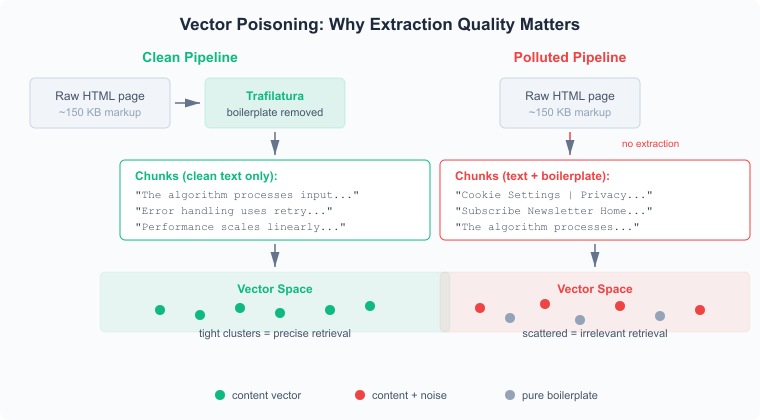 How boilerplate contaminates vector space and degrades retrieval
When you embed text that contains boilerplate — navigation links, cookie banners, "Subscribe to our newsletter," footer legalese — those strings get their own vector representations. They don't vanish. They sit in your vector space, and they're semantically similar to each other across every page you've indexed.
Think about what that means for retrieval. A user asks "How do I handle authentication errors?" Your vector search returns five chunks. Two of them are actual documentation about authentication. Three of them are boilerplate text from three different pages — cookie policy fragments, navigation text, sidebar widget content — that happened to have a slightly higher cosine similarity to the query than the next-best real chunk.
The LLM sees all five chunks in its context window. It tries to synthesize an answer from a mix of relevant documentation and random page furniture. The answer quality drops. Not catastrophically — the model is smart enough to mostly ignore irrelevant context — but measurably. And the user who asked about authentication errors gets a response that's a little less specific, a little more generic, than it should be.
OWASP flagged this class of problem in their 2025 LLM Top 10 as "Vector and Embedding Weaknesses" — LLM0810. Their focus is on intentional poisoning attacks, but the accidental version — polluting your own vector store with boilerplate because you skipped extraction — is far more common in practice.
The fix is boring: extract properly before you chunk. Run Trafilatura or Contextractor on every page. Verify a sample of extraction results by hand. A clean pipeline with a mediocre embedding model will outperform a dirty pipeline with a top-tier one.
Putting it together
Here's the full ingestion pipeline wired up end to end:
import asyncio
from crawlee.crawlers import BeautifulSoupCrawler, BeautifulSoupCrawlingContext
from trafilatura import extract
from langchain.text_splitter import RecursiveCharacterTextSplitter
from openai import OpenAI
from qdrant_client import QdrantClient
from qdrant_client.models import Distance, VectorParams, PointStruct

openai_client = OpenAI()
qdrant = QdrantClient(":memory:")
qdrant.create_collection(
    "docs", vectors_config=VectorParams(size=512, distance=Distance.COSINE)
)

splitter = RecursiveCharacterTextSplitter(chunk_size=512, chunk_overlap=64)
point_id = 0


async def process_page(url: str, html: str) -> None:
    global point_id

    text = extract(html, output_format="txt", favor_precision=True, url=url)
    if not text or len(text) < 100:
        return

    chunks = splitter.split_text(text)

    response = openai_client.embeddings.create(
        model="text-embedding-3-small", input=chunks, dimensions=512
    )
    vectors = [item.embedding for item in response.data]

    points = [
        PointStruct(
            id=point_id + i,
            vector=vec,
            payload={"text": chunk, "url": url},
        )
        for i, (vec, chunk) in enumerate(zip(vectors, chunks))
    ]
    point_id += len(points)
    qdrant.upsert("docs", points)


crawler = BeautifulSoupCrawler(max_requests_per_crawl=50)


@crawler.router.default_handler
async def handle(context: BeautifulSoupCrawlingContext) -> None:
    await process_page(context.request.url, str(context.soup))
    await context.enqueue_links(strategy="same-domain")


asyncio.run(crawler.run(["https://docs.example.com/"]))
Fifty lines. Crawl a docs site, extract article text from every page, chunk it, embed it, store it in Qdrant. The extraction step — that single extract() call — is what separates a RAG system that gives useful answers from one that returns cookie policy fragments.
You can reduce your LLM token costs significantly by extracting clean text before sending anything to the embedding API. Fewer tokens per chunk means fewer API calls, and the chunks you do embed carry more semantic signal per dimension.
The gap between a demo RAG pipeline and a production one isn't the vector database or the embedding model. It's whether you treated web content as clean text when it isn't.
Citations
-
Apify: Crawlee for Python. Retrieved March 27, 2026 ↩
-
Janek Bevendorff, Sanket Gupta, Johannes Kiesel, Benno Stein: An Empirical Comparison of Web Content Extraction Algorithms. Proceedings of SIGIR 2023 ↩
-
Adrien Barbaresi: Trafilatura: A Web Scraping Library and Command-Line Tool for Text Discovery and Extraction. Proceedings of ACL-IJCNLP 2021: System Demonstrations, pp. 122-131 ↩
-
Weaviate: Chunking Strategies for RAG. Retrieved March 27, 2026 ↩
-
NVIDIA: Finding the Best Chunking Strategy for Accurate AI Responses. Retrieved March 27, 2026 ↩
-
OpenAI: Embeddings. Retrieved March 27, 2026 ↩
-
Qdrant: Documentation. Retrieved March 27, 2026 ↩
-
ChromaDB: Documentation. Retrieved March 27, 2026 ↩
-
OWASP: LLM08:2025 Vector and Embedding Weaknesses. OWASP Top 10 for LLM Applications 2025 ↩
Updated: March 27, 2026