
How to reduce LLM token costs by 70% with smart HTML cleaning
Take any news article, right-click, view source. You'll see maybe 800 words of journalism buried inside 90KB of markup — navigation bars, ad containers, tracking scripts, cookie consent modals, related article widgets, newsletter signup forms, footer links to every section of the site. All of it is text. All of it gets tokenized. And all of it costs you money when you send it through an LLM API.
I keep running into teams that build RAG pipelines or web-scraping agents and just... dump the raw HTML into their prompt. Then they wonder why their monthly OpenAI bill looks like a car payment.
Where the tokens actually go
The HTTP Archive's 2025 Web Almanac reports a median HTML transfer size of 22KB for desktop pages1. But that's compressed. Uncompressed, a typical content page easily hits 90-150KB of markup. A December 2025 arXiv paper measured the median web page at roughly 870KB of HTML, translating to approximately 223,000 tokens2. That's an extreme case (it includes very heavy pages), but even a normal news article from Reuters or The Guardian produces 20,000-30,000 tokens when you feed the full HTML to a tokenizer.
Where does it all come from? I ran a few dozen pages through OpenAI's tiktoken and broke down the token counts by element type:
Scripts and styles — typically 35-45% of total tokens. Inline JavaScript, <style> blocks, JSON-LD metadata blobs, analytics snippets. A single Google Tag Manager container can add 3,000-5,000 tokens by itself.
Navigation and chrome — another 15-25%. Headers, footers, sidebars, breadcrumbs, mega-menus. A site with a mega-menu in the <nav> element can burn 2,000+ tokens on navigation alone. None of this is the article.
Boilerplate and widgets — 10-15%. Cookie banners, newsletter prompts, related articles, comment sections, social sharing buttons. These are repeated identically on every page of the site.
Actual article content — the remaining 13-25%. That's it. On a page that tokenizes to 23,500 tokens, the text a human came to read might be 3,000-4,000 tokens.
The ratio gets worse on e-commerce sites. Product pages on major retailers can tokenize to 50,000+ tokens, with the product description and specs accounting for under 2,000.
Progressive cleaning: four stages
Not every project needs the same level of cleaning. Here's what happens at each stage, with token counts from a real 23,500-token news article page.
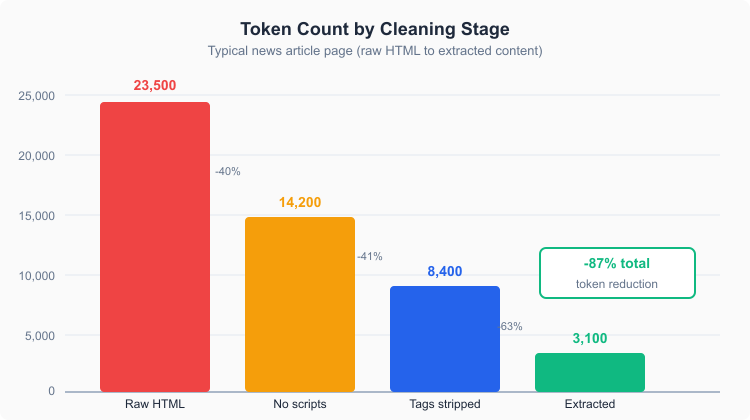 Token reduction at each cleaning stage
Stage one: strip scripts and styles
Remove all <script> and <style> elements, plus HTML comments. This is trivial to implement — a few lines of BeautifulSoup or a regex if you're feeling reckless.
Result: ~14,200 tokens. A 40% reduction for maybe 5 lines of code.
The catch: you still have all the markup structure, the navigation, the footer, the sidebars. The LLM still sees <nav class="site-header__navigation--primary"> and every <li> inside it.
Stage two: strip all HTML tags
Remove every HTML tag and keep only the text content. This is what BeautifulSoup.get_text() does, or innerText in a browser.
Result: ~8,400 tokens. Another 41% gone.
But now you've got a different problem. The text from the navigation, footer, and sidebar is mashed into the article text with no separation. "Home About Contact Subscribe to our newsletter" runs straight into the first paragraph. The LLM can usually figure out what's content and what isn't — but you're still paying for all those nav-label tokens, and the noise hurts retrieval quality in RAG pipelines.
Stage three: content extraction
This is where tools like Trafilatura come in. Instead of blindly stripping tags, a content extractor analyzes the page structure — text density, link density, element classification — and pulls out just the main article text. Navigation, ads, sidebars, footers: gone.
Result: ~3,100 tokens. An 87% reduction from the original HTML.
The extracted text is clean, readable, and contains only what a human would consider the article. For RAG applications, this is the difference between good and bad retrieval — you're embedding the actual content, not navigation labels and cookie policy fragments.
When to use which stage
Stage one (strip scripts) is fine for quick prototyping. Stage two (strip tags) works if your pages are simple and you don't mind some noise. Stage three (content extraction) is what you want in production — especially when you're processing thousands or millions of pages and every token costs money.
I'd argue most teams should skip straight to stage three. The extraction libraries are free and fast — Trafilatura processes pre-downloaded HTML in single-digit milliseconds.
The cost math
Let's put real numbers to this. All pricing below is as of March 2026, based on published API rates from OpenAI, Anthropic, and Google345.
The scenario: you're processing 100,000 web pages per month through an LLM. Maybe it's a RAG pipeline ingesting news articles, a research tool summarizing web content, or an agent that reads pages to answer questions. At 23,500 tokens per raw page vs. 3,100 tokens after extraction, the difference in input token costs is dramatic.
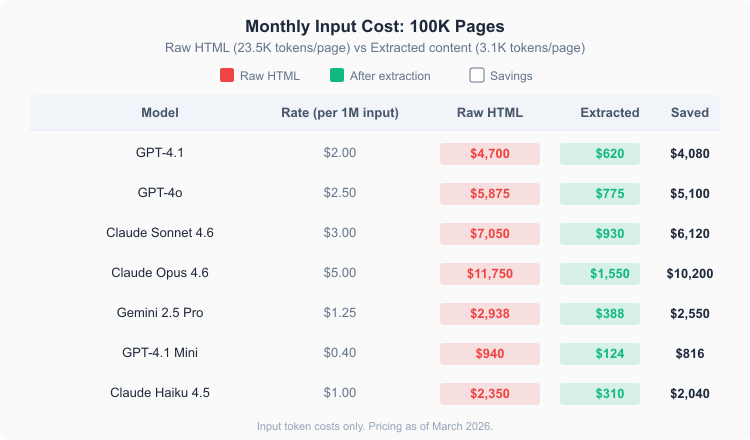 Cost savings from content extraction across seven LLM models
| Model | Rate (per 1M input tokens) | Raw HTML cost | Extracted cost | Monthly savings |
|---|---|---|---|---|
| GPT-4.1 | $2.00 | $4,700 | $620 | $4,080 |
| GPT-4o | $2.50 | $5,875 | $775 | $5,100 |
| Claude Sonnet 4.6 | $3.00 | $7,050 | $930 | $6,120 |
| Claude Opus 4.6 | $5.00 | $11,750 | $1,550 | $10,200 |
| Gemini 2.5 Pro | $1.25 | $2,938 | $388 | $2,550 |
| GPT-4.1 Mini | $0.40 | $940 | $124 | $816 |
| Claude Haiku 4.5 | $1.00 | $2,350 | $310 | $2,040 |
These are input tokens only — output costs are separate and depend on your use case. But input is where the waste lives, because you control what goes in.
The savings percentage is the same across all models (~87%), but the absolute dollar amount scales with the model price. On Claude Opus 4.6, you're looking at over $10,000/month in savings. Even on the cheapest model in the table (GPT-4.1 Mini), it's $816/month — almost $10,000 a year.
It's not just about cost
Token reduction has side effects beyond the bill.
Latency drops. Fewer input tokens means faster time-to-first-token. If you're building a user-facing application that reads web pages, cutting input by 87% makes a noticeable difference in response times — especially on models where prompt processing is the bottleneck.
Quality improves. A 2025 Chroma Research study on context degradation found that LLM performance on retrieval tasks decreases as the input length grows, even when the context window technically supports it6. Sending 3K tokens of clean article text instead of 23K tokens of HTML-with-article-somewhere-inside-it means the model spends its attention on content, not on parsing through <div class="ad-container__wrapper--sticky">.
Context window goes further. If you're stuffing multiple documents into a single prompt — say, feeding an LLM five web pages for comparison — each page at 23K tokens eats 117K tokens total. After extraction, the same five pages fit in 15.5K tokens. That's the difference between fitting inside GPT-4.1 Mini's context window comfortably and blowing past it.
Extraction tools that actually work
The SIGIR 2023 benchmarking study tested 14 extraction tools and found that heuristic-based extractors outperform neural models on heterogeneous web pages7. The top performers:
Trafilatura — best overall mean F1 (0.883) across eight datasets. Uses a three-stage pipeline: tree pruning, content scoring, and a fallback chain through readability-lxml and jusText. Version 2.0.0 shipped December 3, 2024, with Apache 2.0 licensing8. It's what Contextractor runs under the hood.
Readability — Mozilla's extraction algorithm (used in Firefox Reader Mode). Highest median F1 (0.970) in the SIGIR study. The JavaScript version is mature; readability-lxml is the Python port.
newspaper4k — successor to the long-unmaintained newspaper3k. Focused on news articles specifically, with decent F1 scores (0.949 on ScrapingHub's benchmark)9.
For most use cases, Trafilatura is the right choice. It handles the widest variety of page types and its fallback chain means it rarely fails completely on unusual layouts.
A worked example
Here's what this looks like in practice. Say you're building a RAG pipeline that ingests 50,000 news articles per month from 200 different news sites, and you use Claude Sonnet 4.6 for summarization.
Without extraction:
- 50,000 pages x 23,500 tokens = 1.175 billion input tokens
- At $3.00/MTok = $3,525/month
With Trafilatura extraction:
- 50,000 pages x 3,100 tokens = 155 million input tokens
- At $3.00/MTok = $465/month
Savings: $3,060/month, or $36,720/year. And that's just one model at moderate volume.
The extraction step itself costs almost nothing computationally. Trafilatura runs on CPU, processes a page in under 10 milliseconds, and uses negligible memory. You could extract 50,000 pages on a $5/month VPS.
Batch API stacking
Most providers offer a batch API with 50% off input tokens for asynchronous processing43. If your workflow doesn't need real-time responses — nightly ingestion of news articles, weekly research reports, periodic content indexing — you can stack content extraction with batch pricing.
On Claude Sonnet 4.6, batch input is $1.50/MTok. Combined with extraction:
- Raw HTML, standard API: $3,525/month (from the example above)
- Extracted content, batch API: $232/month
That's a 93% reduction from the baseline. The two optimizations (extraction + batch) are independent and multiply together.
OpenAI's cached input pricing on GPT-4.1 ($0.50/MTok for repeated prompts) is another multiplier worth stacking if your system prompt or few-shot examples are consistent across requests.
What extraction can't fix
Content extraction isn't magic. A few things it won't help with:
If the "content" itself is enormous — academic papers, legal documents, government reports — extraction has less to trim. These pages are mostly content already. You'll still see a reduction from stripping headers and navigation, but it might be 30% instead of 87%.
JavaScript-rendered pages (React SPAs, for instance) need a headless browser like Playwright to render the DOM before extraction can work. The extraction library itself doesn't execute JS.
And extraction doesn't reduce output tokens at all. If your LLM generates long responses, that's a separate cost axis. Shorter, cleaner input tends to produce shorter output — but it's not guaranteed.
Contextractor handles the extraction step for you, including JavaScript rendering when needed, so you can focus on what to do with the clean text rather than how to get it.
Citations
-
HTTP Archive: Page Weight - 2025 Web Almanac. Retrieved March 27, 2026 ↩
-
Yihan Chen, Benfeng Xu, Xiaorui Wang, Zhendong Mao: An Index-based Approach for Efficient and Effective Web Content Extraction. arXiv, December 2025 ↩
-
OpenAI: API Pricing. Retrieved March 27, 2026 ↩ ↩2
-
Anthropic: Claude API Pricing. Retrieved March 27, 2026 ↩ ↩2
-
Google: Gemini API Pricing. Retrieved March 27, 2026 ↩
-
Chroma Research: Context Rot: How Increasing Input Tokens Impacts LLM Performance. Retrieved March 27, 2026 ↩
-
Janek Bevendorff, Sanket Gupta, Johannes Kiesel, Benno Stein: An Empirical Comparison of Web Content Extraction Algorithms. Proceedings of SIGIR 2023 ↩
-
Trafilatura: PyPI package page. Retrieved March 27, 2026 ↩
-
Trafilatura: Evaluation and benchmarks. Retrieved March 27, 2026 ↩
Updated: March 23, 2026